The one-off purchase journey is the path customers take when they want to try your service once without committing to a subscription. Understanding this journey helps you optimize the experience and potentially convert one-off customers to subscribers later.
Important: This article covers the one-off purchase journey specifically. For subscription journey, see BC-003 Understanding Subscription Journey.
This guide walks through what customers experience when making a one-off purchase.
The Complete Journey Overview
Discovery: Customer finds your live site
Selection: Customer chooses a service and one-off option
Checkout: Customer pays for one-time service
Confirmation: Customer receives order confirmation
Service Delivery: You deliver service once
Completion: Service marked complete, transaction ends
Key difference from subscriptions: One-off purchases are single transactions with no ongoing relationship, billing, or automatic scheduling.
Stage 1: Discovery
One-off customers discover your services the same way subscription customers do, but with one important difference.
Discovery methods:
Public site visit only: Customers must find and visit your live site through:
Typing URL directly
Scanning QR codes
Clicking social media links
Finding you through Google search
Referrals from existing customers
⚠️ IMPORTANT: You cannot send direct invitations for one-off purchases. Direct invitations work only for subscriptions. One-off customers must discover and purchase through your live site.
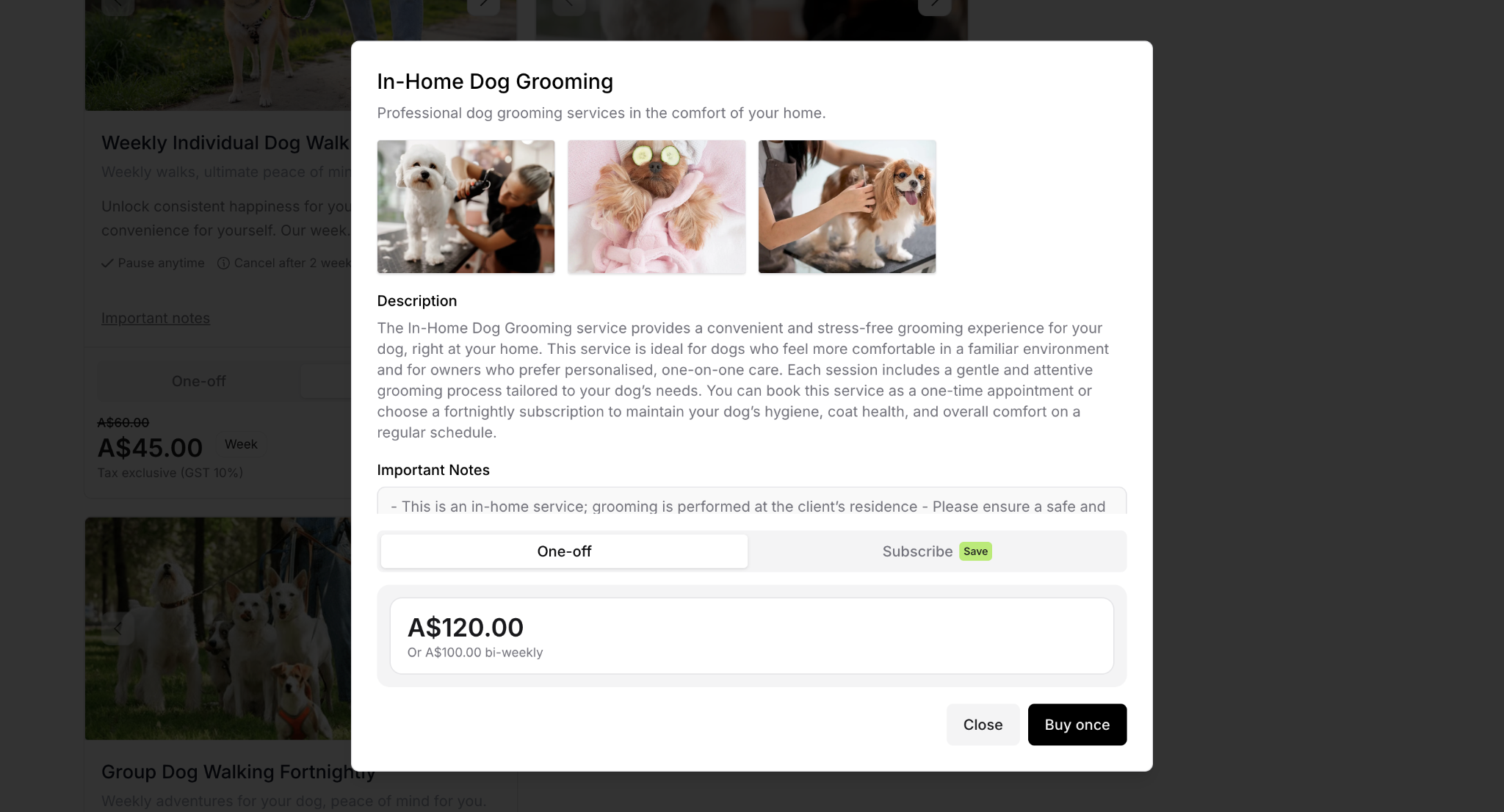
First impression on your live site:
When customers arrive, they see:
All your available services
Both subscription and one-off pricing (if you've enabled one-off purchases)
Service descriptions and images
Terms and policies
✍️ TIP: If you've enabled "Show subscription savings," customers will see the price difference, which might influence some to choose subscription over one-off.
Stage 2: Selection
After discovery, customers evaluate your offerings and decide to make a one-off purchase rather than subscribe.
What customers review:
Service options available
One-off pricing vs. subscription pricing
What's included in single delivery
Before/after photos of your work
Service descriptions
Fulfillment timeline (how soon service will be delivered)
Why customers choose one-off over subscription:
Want to try service before committing
Only need service occasionally
Not ready for recurring commitment
Prefer flexibility over savings
Testing quality before subscribing
Adding to Cart
Once the customer decides on a one-off purchase:
Customer actions:
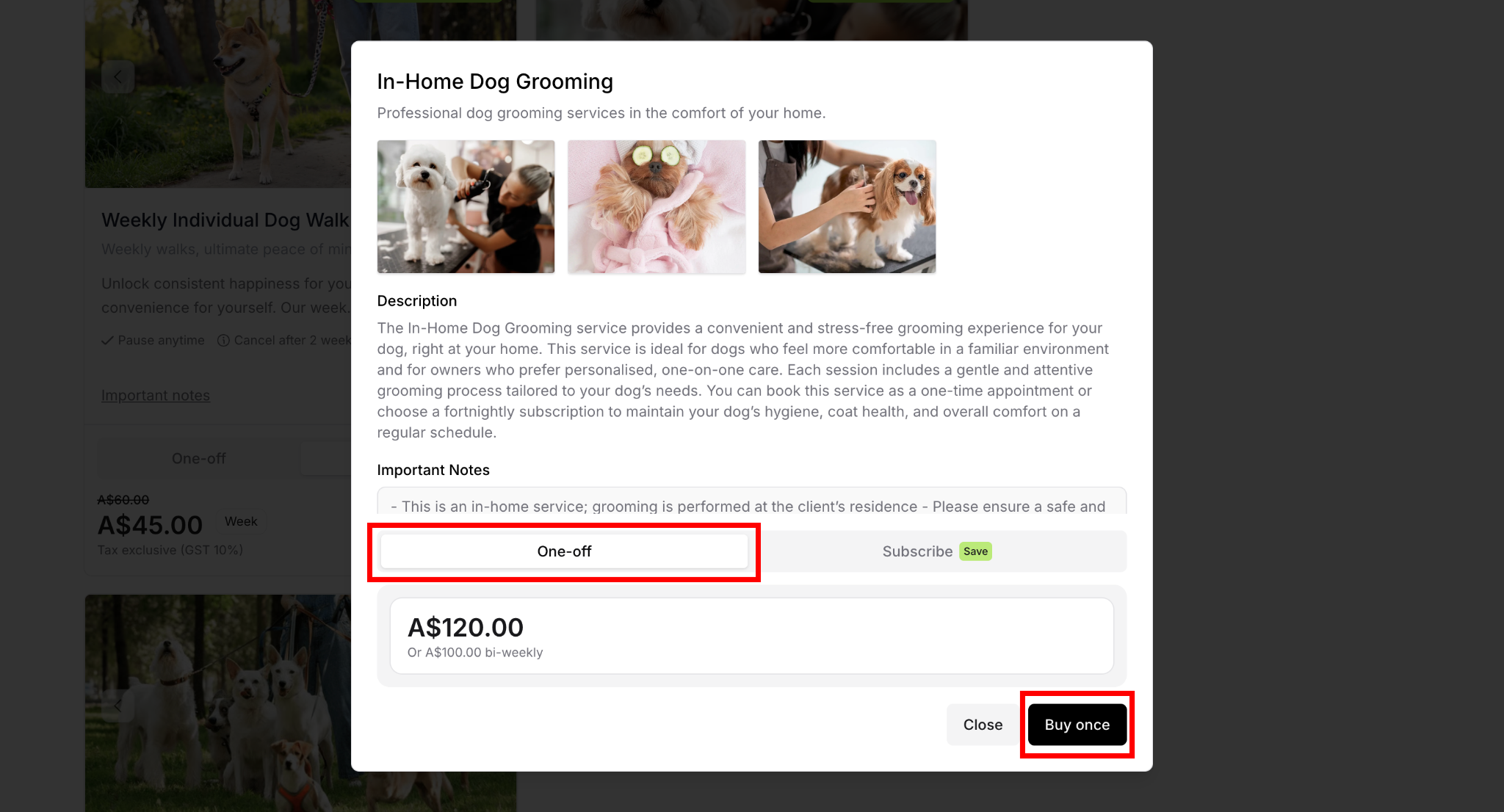
Clicks on their desired service
Reviews complete service details
Selects pricing tier (if variable pricing exists)
Chooses "One-off" or "Buy Once" option (not subscription)
Selected service is added to cart
What happens next: Customers are prompted to enter email for OTP verification, selected one-off purchase is added to cart, and they're ready to proceed to checkout.
Stage 3: Checkout
After selecting a one-off purchase, customers proceed to checkout. The process is identical to subscription checkout.
OTP Verification
Email verification process:
If the customer isn't already logged in:
They enter their email address
Receive a One-Time Password (OTP) via email
Enter the OTP code on the page
Their account is verified for access
Purpose of OTP:
Confirms email is valid
Creates customer account (even for one-off purchases)
Adds security
Prevents email errors
Checkout Form
Customer provides required information:
Payment information:
Credit or debit card number
Expiration date
CVC security code
Cardholder name
Service address:
Complete address where service will be performed
Property location details
Optional access instructions
Billing address:
Address where payment card is registered
Option to use same as service address
Or enter different billing address
Order Review
Final confirmation before purchasing:
Customer reviews complete purchase summary showing:
Service details
One-off price confirmed
Fulfillment timeline (when service will be delivered)
Terms for one-off purchases
Completing the purchase:
Customer clicks "Complete Purchase" button
Payment processes immediately
Order is confirmed
Service is scheduled for delivery
Customer receives confirmation email
✅ BEST PRACTICE: The checkout process is identical for subscriptions and one-off purchases, which creates consistency and reduces confusion.
Stage 4: Confirmation
After completing checkout, customers receive confirmation of their one-off purchase.
Confirmation Emails
Purchase confirmation:
Thanks customer for their purchase
Displays service details
Shows fulfillment timeline
Provides your contact information
Payment receipt:
Documents payment amount
Date payment was processed
Serves as receipt
Business Owner Notification
You receive automatic notification:
New one-off purchase alert
Customer name and contact
Service they purchased
Scheduled delivery date
Payment confirmation
Customer Portal Access
Limited portal access for one-off customers:
One-off purchase customers can log into customer portal to:
View their purchase details
See service delivery status
Access receipts
Update contact information
What they CANNOT do:
Pause (no subscription to pause)
Cancel on their end (only you can cancel with refund)
Manage billing (already paid)
View upcoming services (only one service)
⚠️ IMPORTANT: One-off customers have limited portal functionality compared to subscribers. They cannot self-cancel—only you can manually cancel and refund one-off purchases through your dashboard.
Stage 5: Service Delivery
One-off purchases follow a single-delivery path with no ongoing cycle.
Service Reminder
Before service delivery:
If you've enabled service reminders, customer receives automated reminder 24-48 hours ahead showing:
Upcoming service date
Time window (if specified)
Preparation instructions
Your contact information
Service Delivery
On service day:
You perform the service as scheduled
Customer receives service
You mark service complete in your Delivery dashboard
Service Completion
After marking complete:
Customer receives completion email:
Confirms work was done
Any notes about the service
Thank you message
Invitation to subscribe for recurring service (optional)
Transaction ends:
No next service scheduled
No future billing
Purchase is complete
Customer can make another one-off purchase or subscribe anytime
✍️ TIP: The completion email is a perfect opportunity to invite satisfied one-off customers to subscribe for recurring service. Highlight the savings and convenience they'd get by subscribing.
One-off Purchase Cancellations
Unlike subscriptions, one-off purchase customers cannot cancel on their own.
Why customers can't self-cancel:
One-off purchases are immediate transactions
No ongoing commitment to manage
Prevents abuse of the system
Requires business owner discretion
⚠️ IMPORTANT: If a customer needs to cancel a one-off purchase, you must handle it manually. Be responsive to these requests to maintain good customer relationships.
How to Cancel a One-off Purchase
Method 1: Via Services
Go to Services in the main navigation
Find the service and click the action menu (⋯)
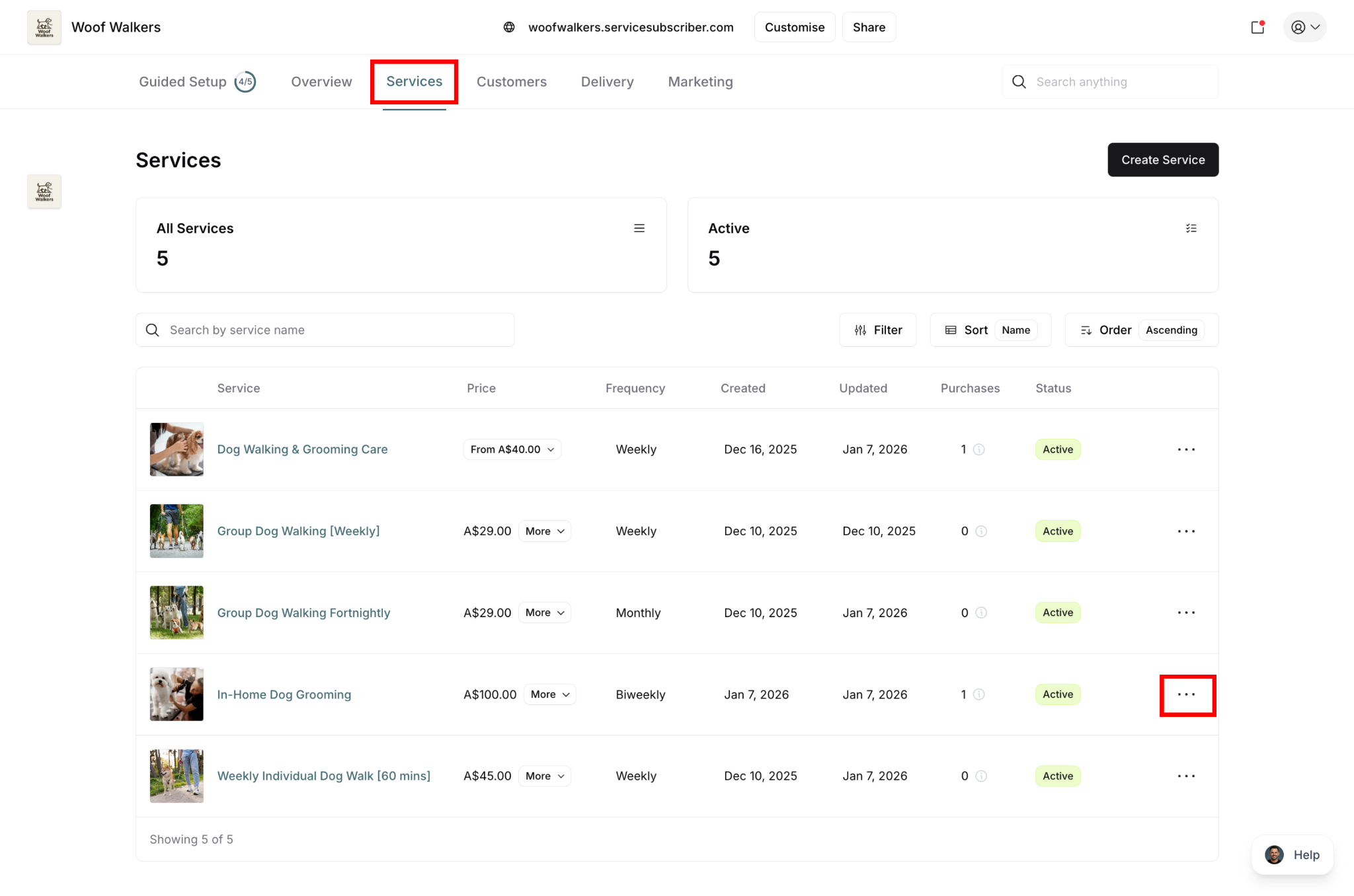
Select Service Details

Navigate to the Purchases tab
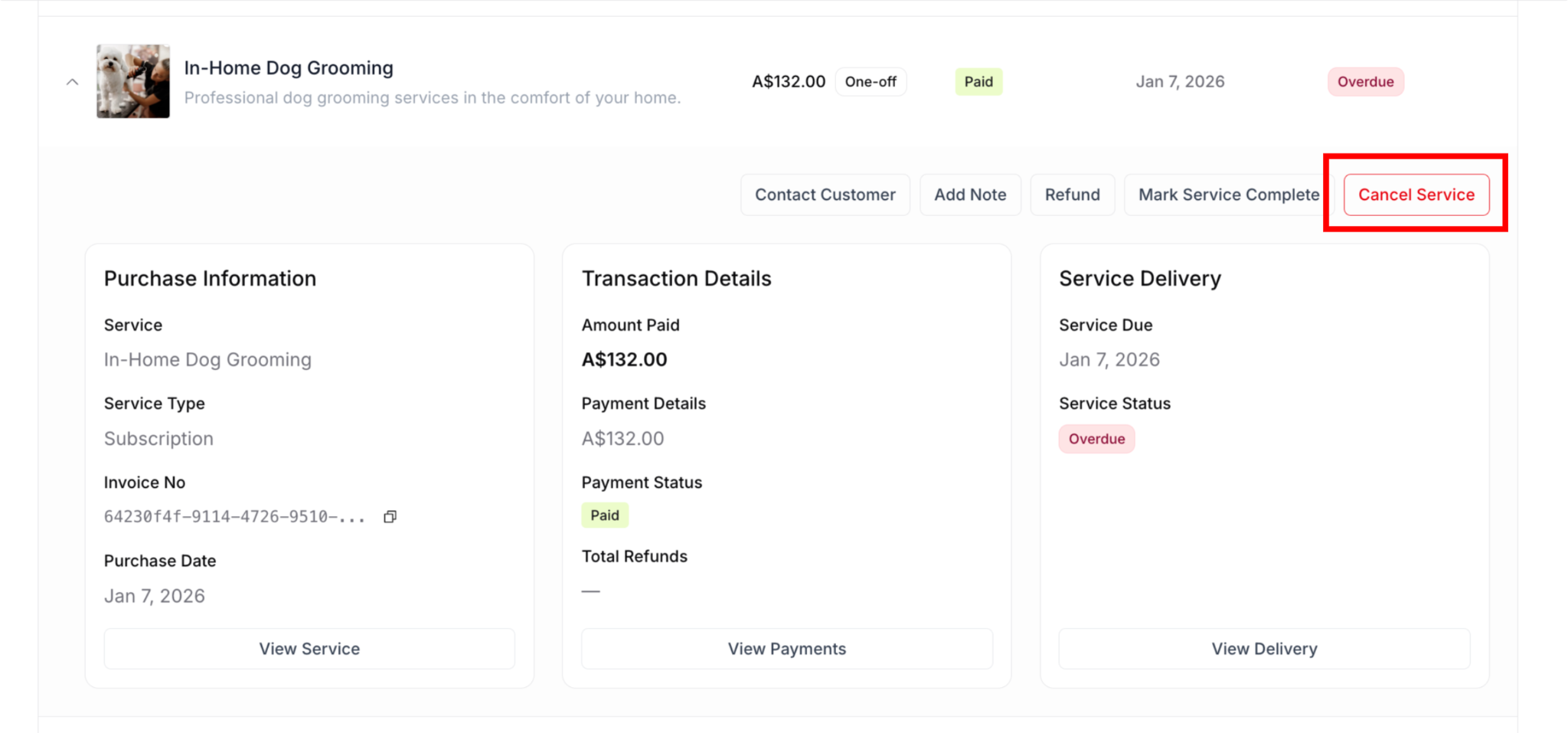
Find the one-off purchase you wish to cancel
Click on the purchase to view details
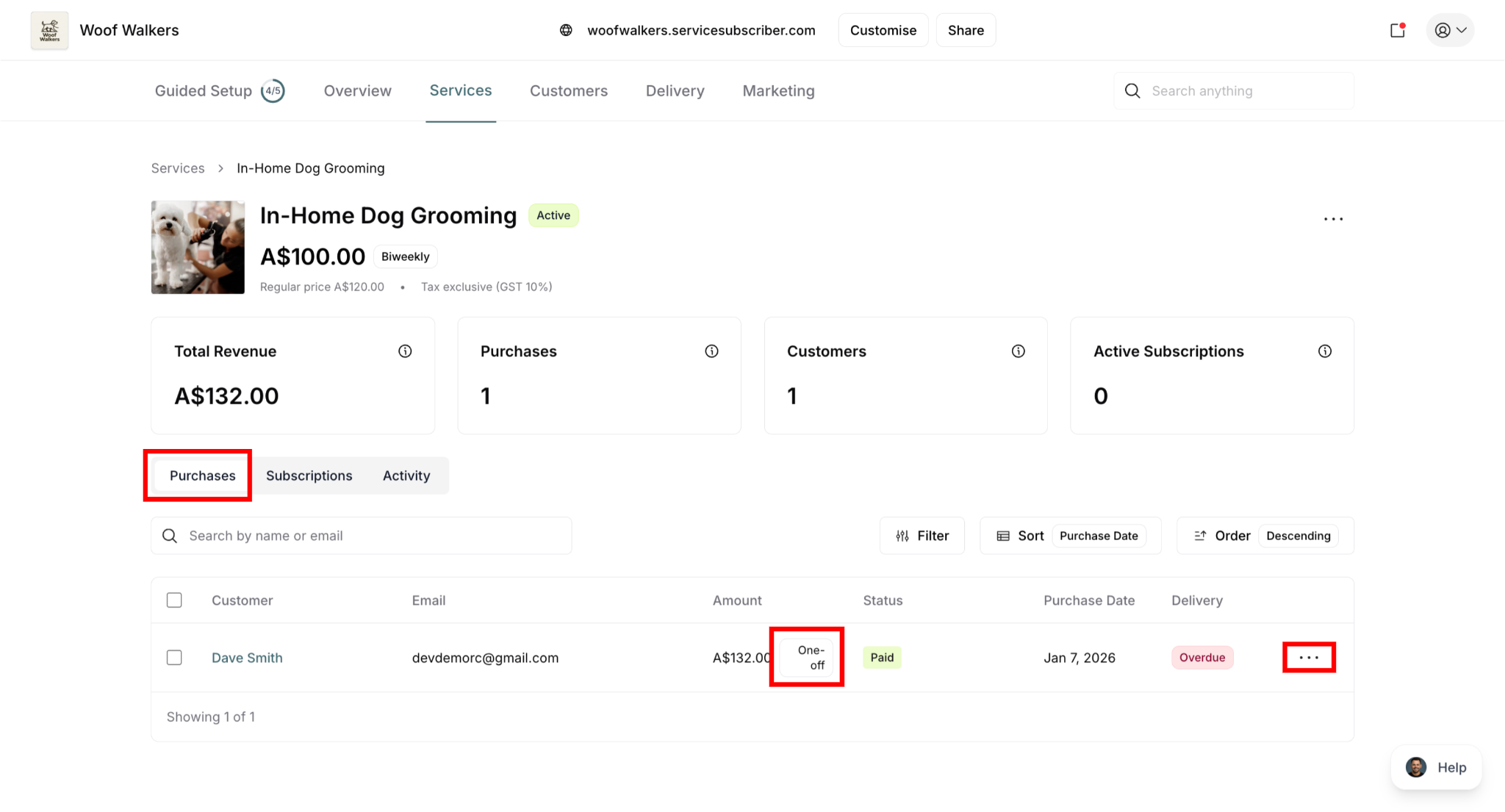
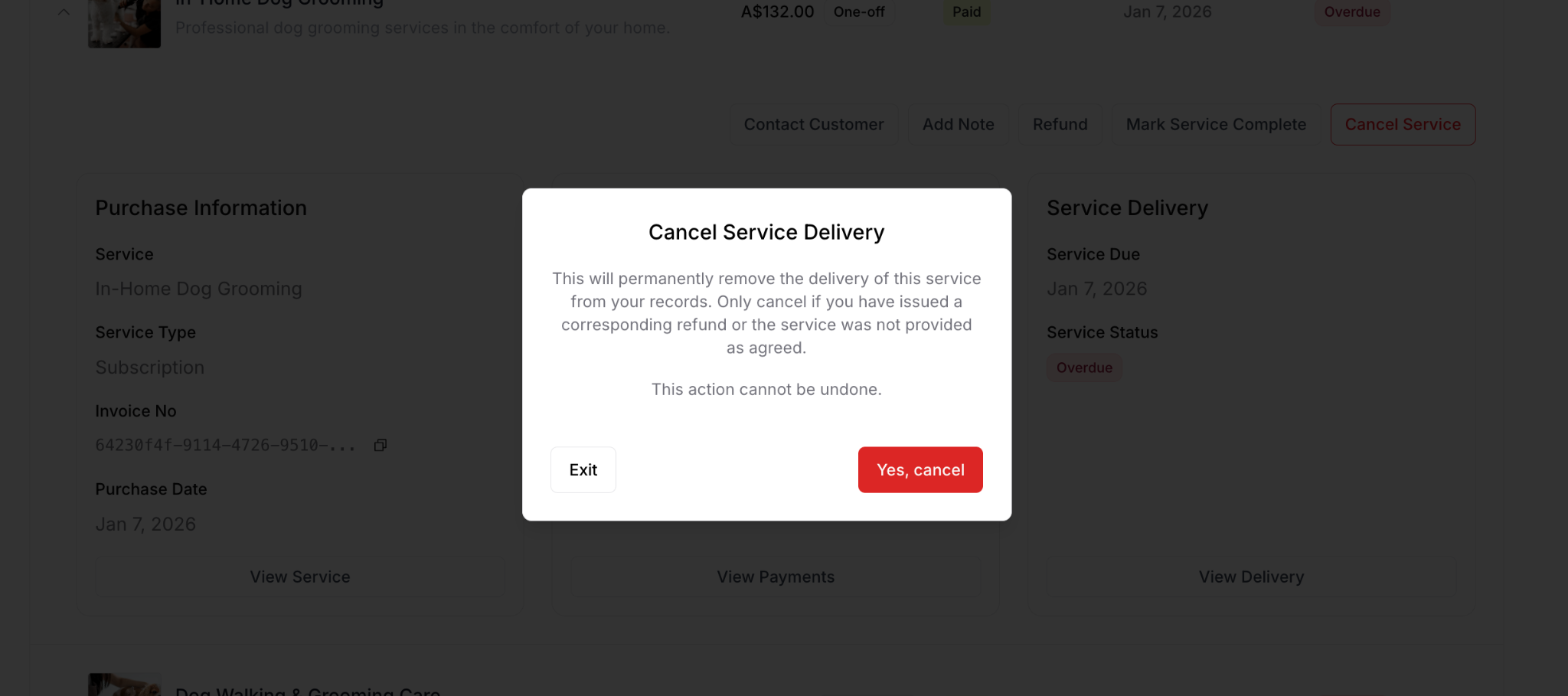
Click Cancel Service button (red button in top right)
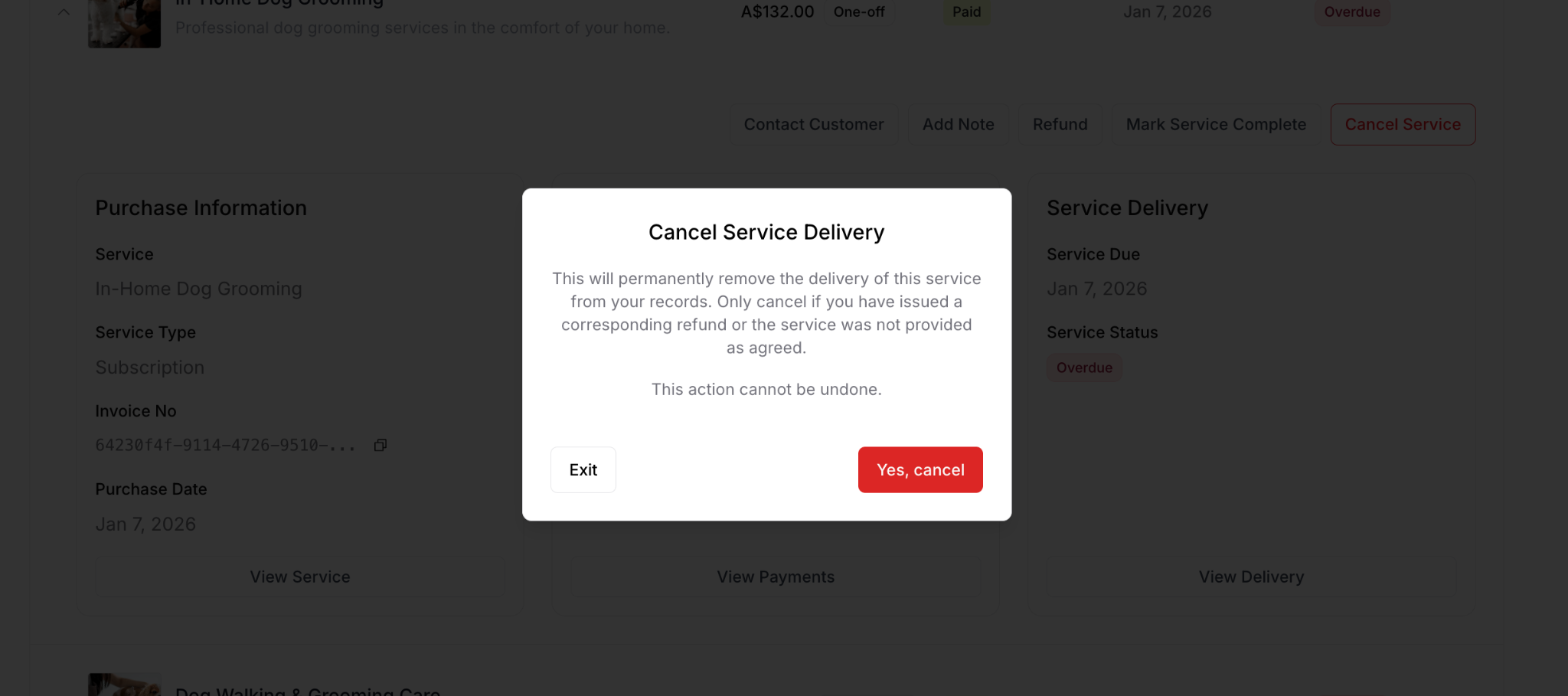
Confirmation modal appears
Click Yes, cancel to confirm
Method 2: Via Customers
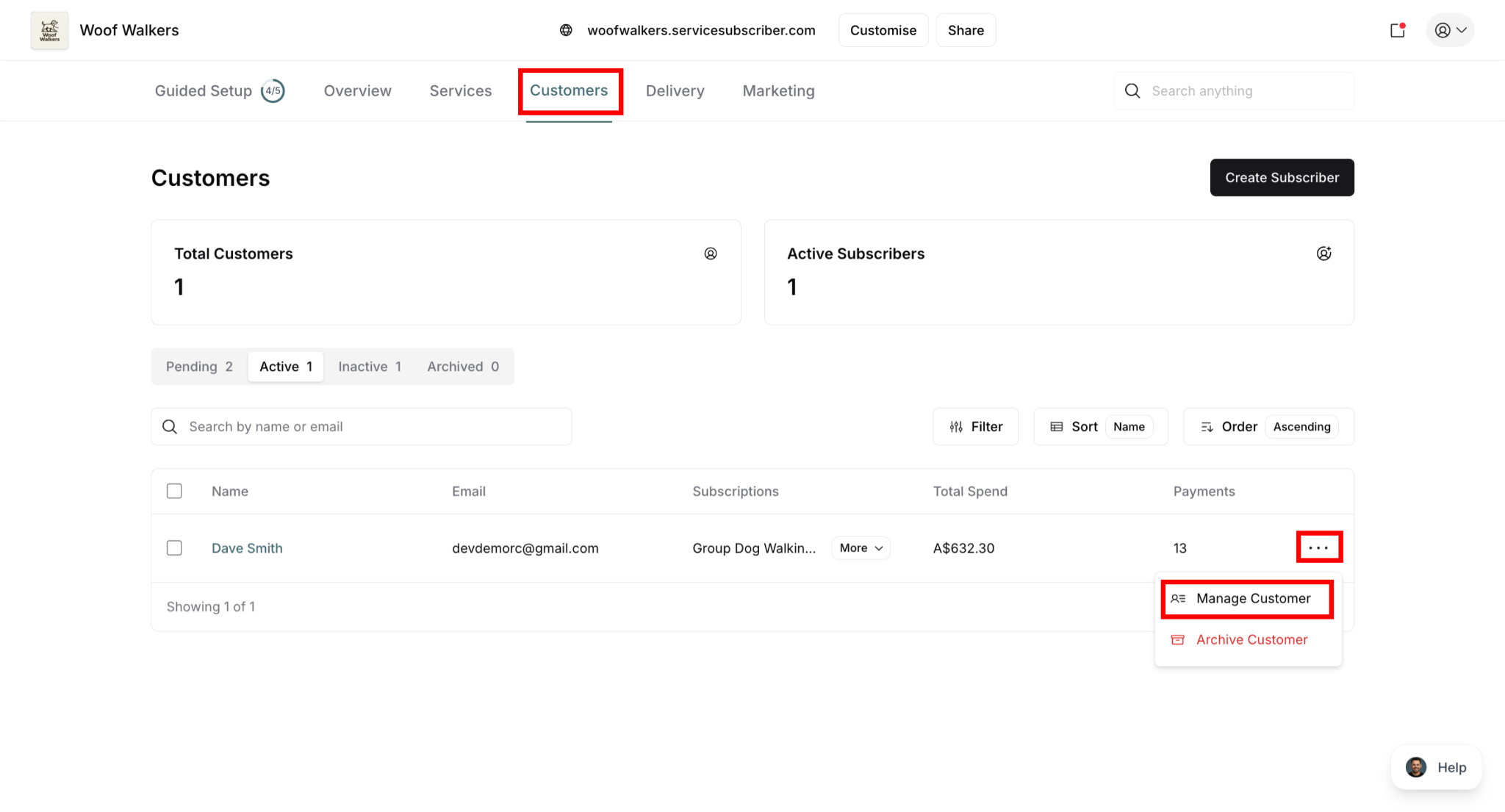
Go to Customers in the main navigation
Find and click the customer's name
Click the action menu (⋯), and select Manage Customer
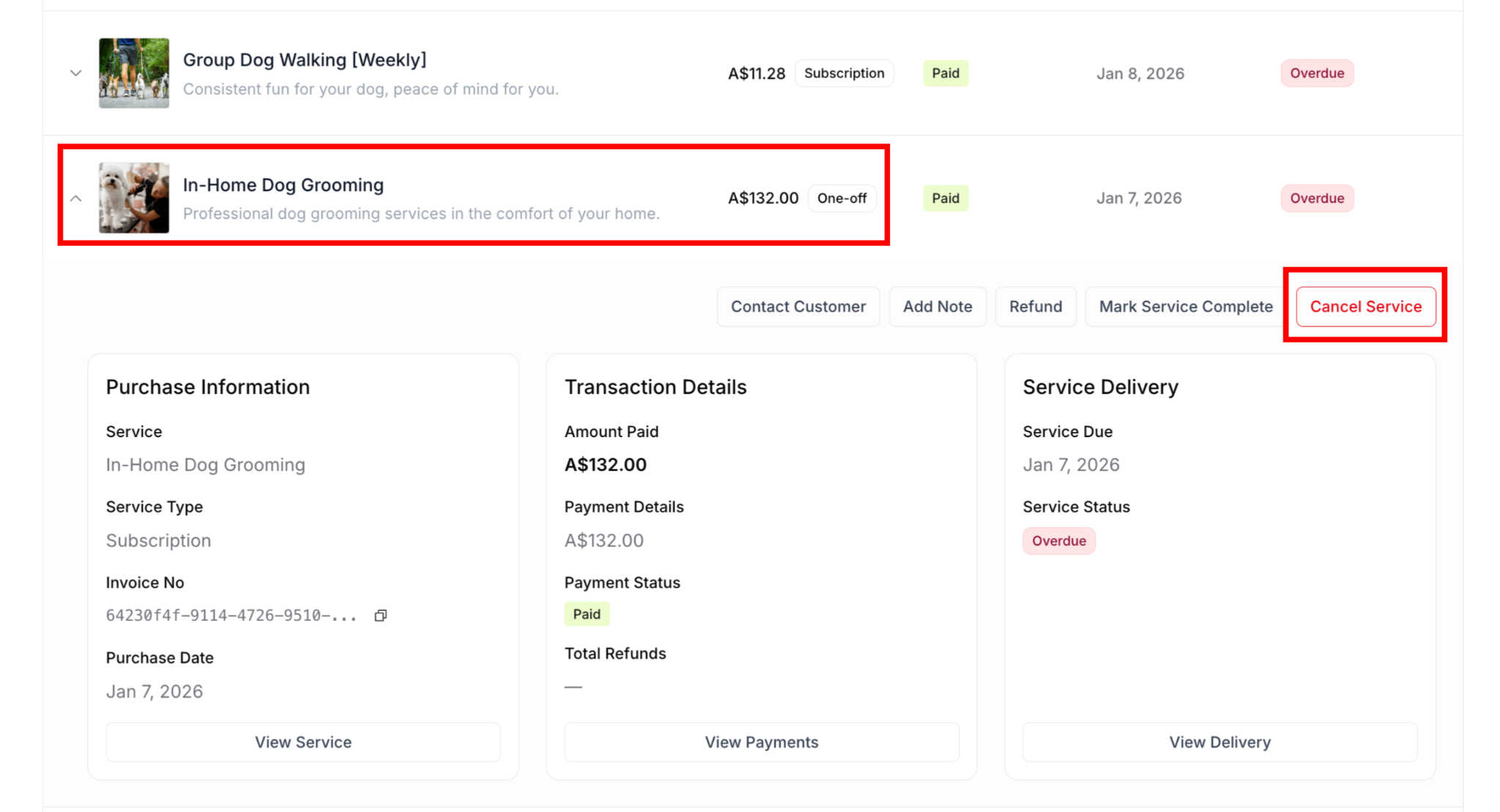
Find the one-off purchase you wish to cancel
Click on the purchase to view details
Click Cancel Service button (red button in top right)
Confirmation modal appears
Click Yes, cancel to confirm
✅ BEST PRACTICE: Communicate with the customer before and after canceling. Let them know you've canceled the service and confirm they've received their refund. Good communication maintains positive relationships even when transactions don't go as planned.
Processing Refunds
The Refund button is available both before and after cancellation. You can issue refunds in either order based on your preference or situation.
Option 1: Refund first, then cancel
Click Refund button on the purchase details page
Process the refund (see MS-006 Processing Refunds for details)
Then click Cancel Service to remove the delivery record
Good for: When you want to ensure refund is processed first
Option 2: Cancel first, then refund
Click Cancel Service to remove the delivery record
Then click Refund button (still available after cancellation)
Process the refund (see MS-006 Processing Refunds for details)
Good for: When you want to immediately stop the service delivery
The Refund button remains available regardless of cancellation status, giving you flexibility to handle refunds and cancellations in the order that works best for each situation.
For detailed instructions on processing refunds, see Processing Refunds.
✍️ TIP: The order doesn't matter functionally—choose what makes sense for your workflow. Some business owners prefer to refund first to ensure the customer is made whole immediately, while others cancel first to immediately remove the service from their delivery schedule.
What Happens After Cancellation
Immediate effects:
Service status changes to "Canceled"
Cancellation date is recorded in Service Notes
Refund button remains available (doesn't disappear)
Service removed from active Delivery dashboard
Cancel Service button is removed
Your next steps:
Process refund if you haven't already (using the Refund button - see MS-006 Processing Refunds)
Contact customer to confirm cancellation
Explain refund timeline if refund was just processed (typically 5-7 business days)
Add notes documenting the reason for cancellation
What customers see:
Purchase shows as "Canceled" in their portal
They receive cancellation notification
Refund confirmation email when refund is processed
Service is removed from their active services
✅ BEST PRACTICE: Handle cancellations and refunds promptly. Communicate with the customer throughout—let them know you've canceled the service and when to expect their refund. Good communication maintains positive relationships even when transactions don't go as planned.
Converting One-off Customers to Subscribers
One-off purchases are excellent opportunities to convert customers to subscriptions.
Conversion opportunities:
After successful delivery:
Send follow-up email highlighting subscription benefits
Offer special subscriber discount for their next purchase
Show savings they'd get by subscribing
Make it easy with direct link to subscribe
In completion email:
Include "Subscribe for regular service" call-to-action
Highlight convenience of automatic scheduling
Show price savings with subscription
Through portal:
Display subscription offer when they log in
Show services available for subscription
One-click conversion option
✅ BEST PRACTICE: Track which one-off customers make repeat one-off purchases. These are your warmest leads for subscription conversion—reach out personally to invite them to subscribe.
Was this article helpful?
That’s Great!
Thank you for your feedback
Sorry! We couldn't be helpful
Thank you for your feedback
Feedback sent
We appreciate your effort and will try to fix the article