The customer subscription journey is the complete path from discovering your services to becoming a long-term subscriber. Understanding this journey helps you optimize each step and create a better experience.
Important: This article covers the subscription journey specifically. For one-off purchase journey, see Understanding One-off Purchase Journey.
This guide walks through what customers experience at every stage of subscribing.
The Complete Journey Overview
Discovery: Customer finds your live site
Selection: Customer chooses a service and subscription option
Checkout: Customer subscribes and pays
Onboarding: Customer receives welcome and first service
Ongoing: Customer receives recurring service automatically
Each stage has specific touchpoints and experiences that impact retention and satisfaction.
Stage 1: Discovery
The first stage is discovery—when potential customers learn about your subscription services and find your live site.
Discovery methods:
Direct invitation: You send an email invitation, customer clicks the link, and arrives at their personalized subscription offer page (subscription only—cannot invite for one-off purchases).
Public site visit: Customers find your URL through marketing efforts—typing it directly, scanning QR codes, clicking social media links, or finding you through Google search.
Referral: Existing customers share your link with friends, family, or neighbors through word-of-mouth recommendations or community posts.
✍️ TIP: Track how customers find you to understand which discovery channels work best and focus your marketing efforts accordingly. Note that direct invitations only work for subscriptions—one-off purchasers must discover and purchase through your live site.
First impression on your live site:
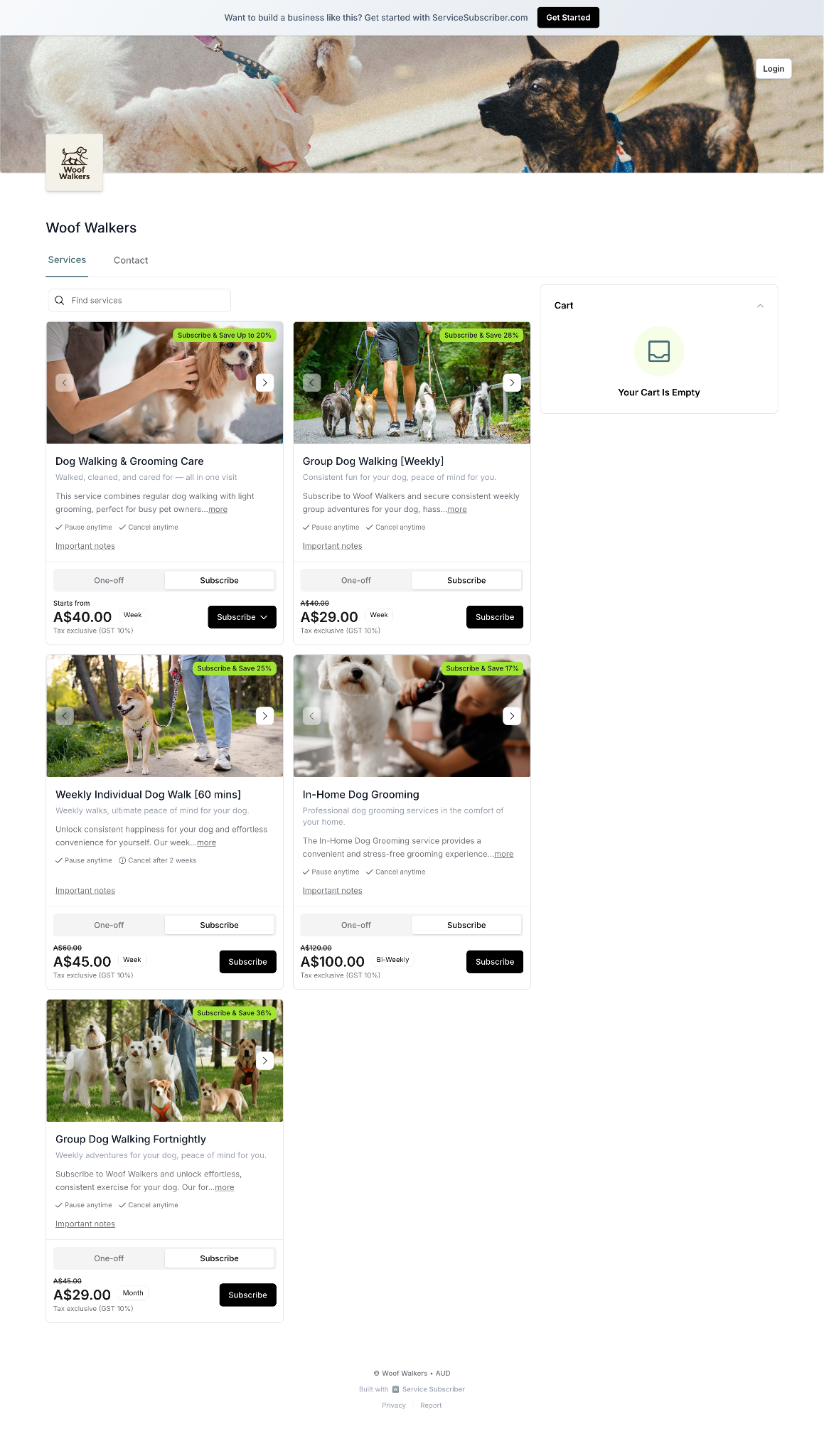
When customers arrive, they see:
All your available services
Both subscription and one-off pricing options (if enabled)
Service descriptions and images
Terms and policies
✍️ TIP: First impressions matter. Invest time in quality images and clear descriptions—they determine if customers keep browsing or leave.
Stage 2: Selection
After discovery, customers evaluate your offerings and decide whether to subscribe.
What customers review:
Service options available
Subscription pricing vs. one-off pricing comparison (if you've enabled "Show subscription savings")
Billing frequency for subscriptions
What's included in delivery
Before/after photos of your work
Detailed service descriptions
Subscription terms (minimum/maximum term, auto-renewal)
Choosing subscription over one-off:
Customers decide to subscribe (rather than make a one-off purchase) when:
Price difference shows clear savings
They need recurring service anyway
Commitment terms are acceptable
Convenience of automatic scheduling appeals to them
Adding to Cart
Once the customer decides to subscribe, they take these steps to add it to their cart and begin the signup process.
Customer actions:
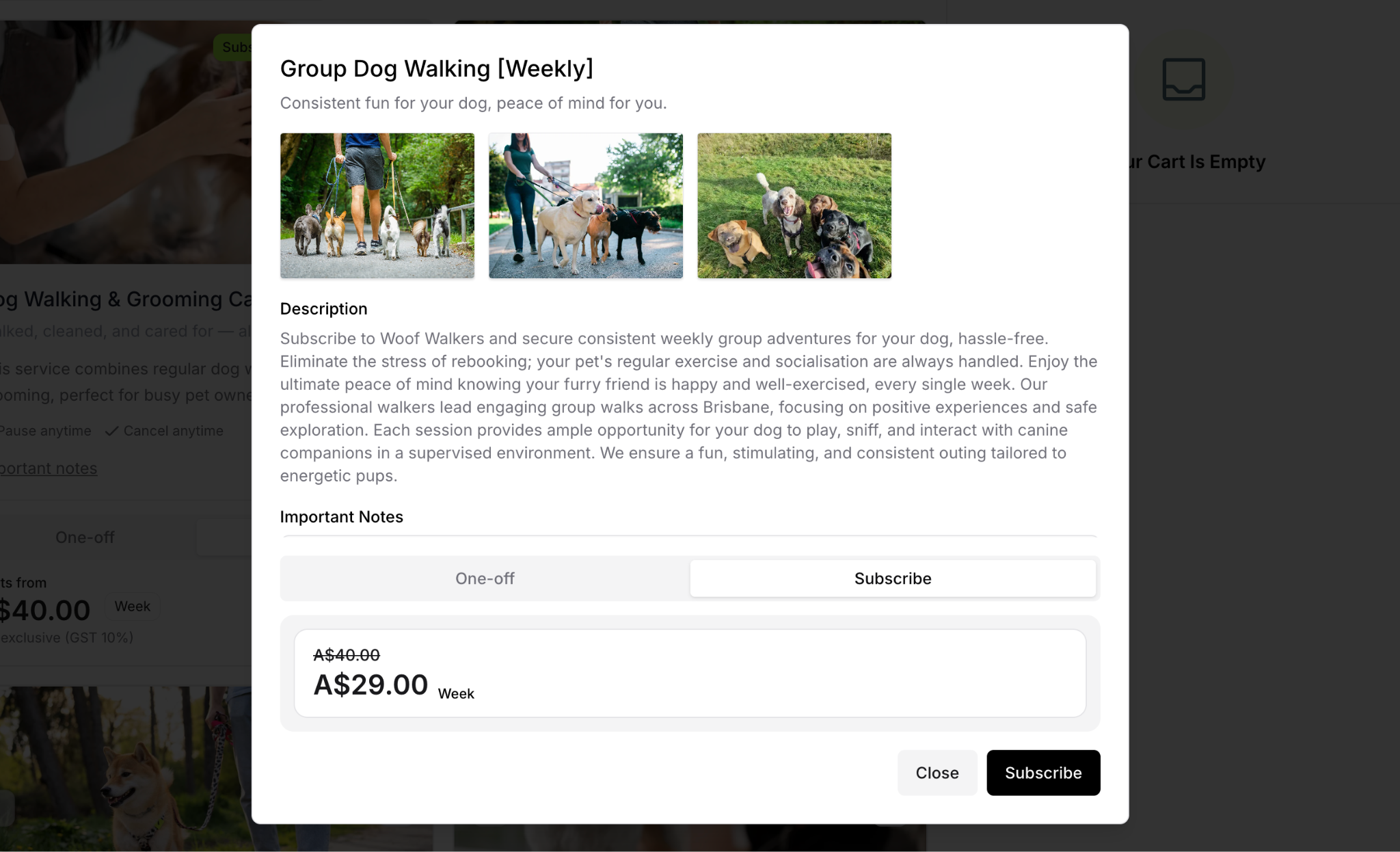
Clicks on their desired service
Reviews complete service details
Selects pricing tier (if variable pricing options exist)
Chooses "Subscribe" button (not one-off option)
Selected service is added to cart
What happens next: Customers are prompted to enter email for OTP verification, selected subscription is added to cart, and they're ready to proceed to checkout and complete signup.
Stage 3: Checkout
After selecting a subscription, customers proceed to checkout where they provide necessary information and complete their subscription.
OTP Verification
Email verification process:
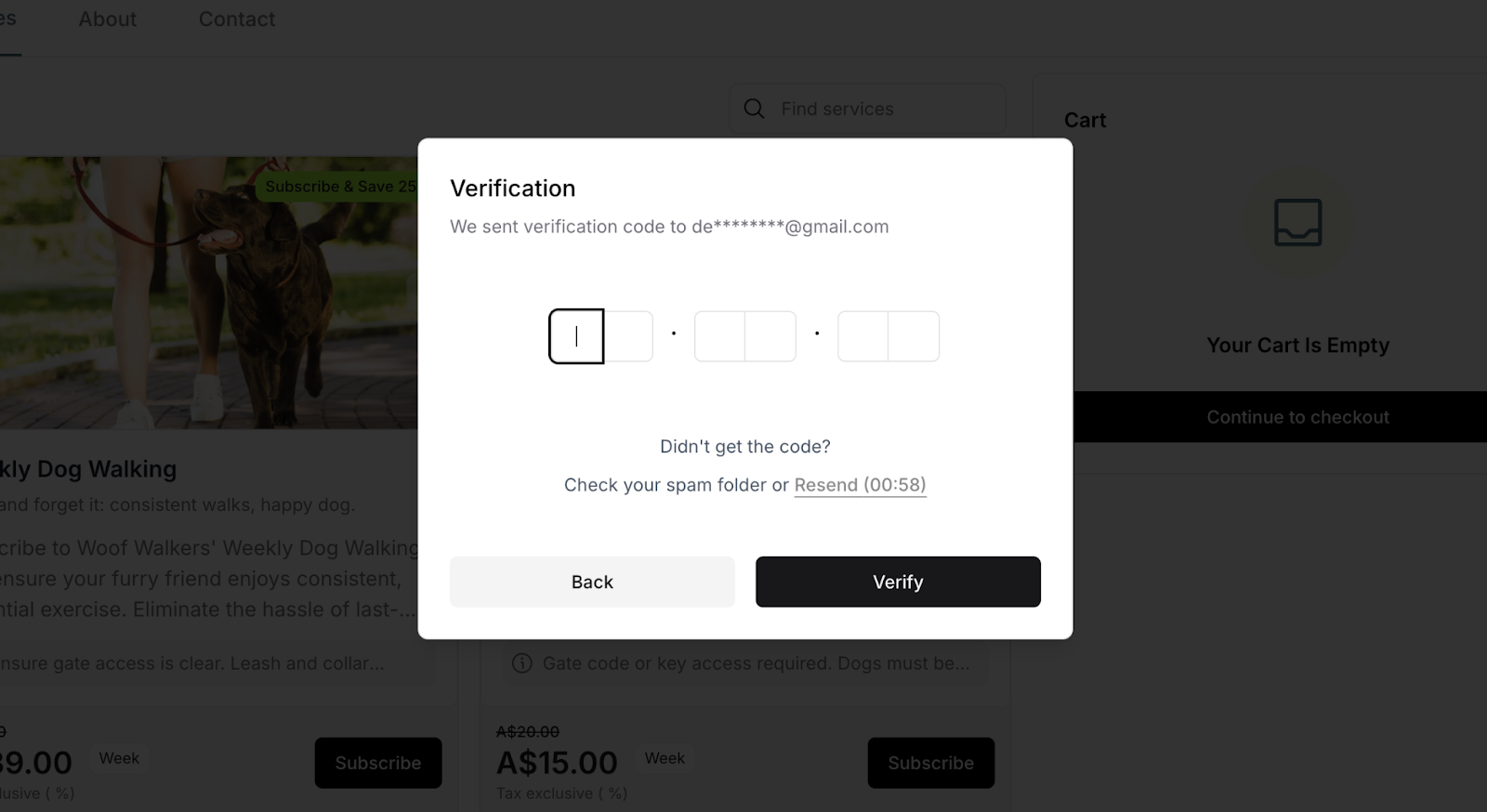
If the customer isn't already logged in:
They enter their email address
Receive a One-Time Password (OTP) via email
Enter the OTP code on the page
Their account is verified for access
Purpose of OTP:
Verification confirms the email address is valid and working
Creates the customer's account for portal access
Adds a security measure to prevent fraud
Prevents email typo errors that would break communication
Checkout Form
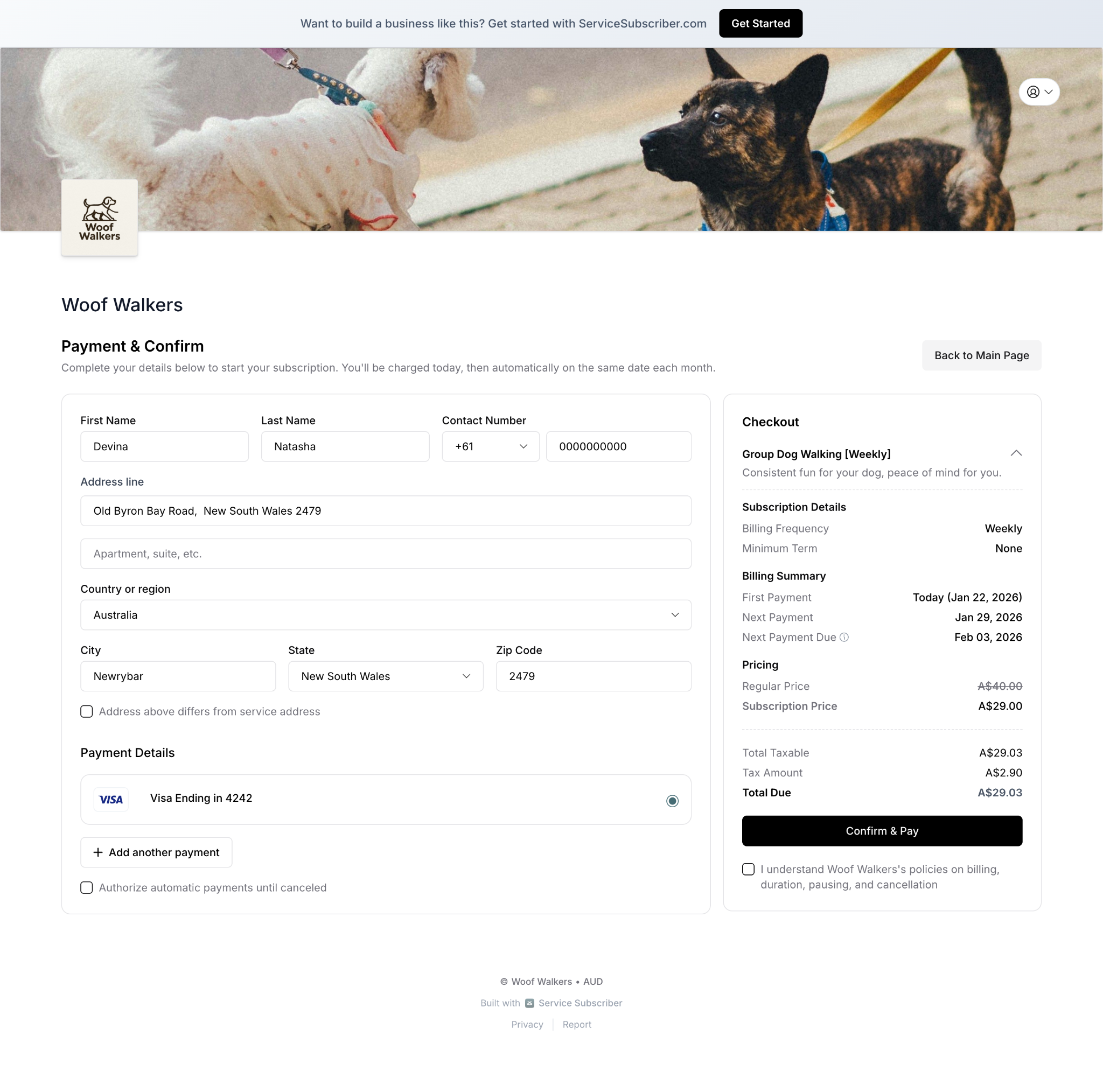
Customer provides required information:
Payment information:
Credit or debit card number
Expiration date
CVC security code
Cardholder name exactly as it appears on the card
Service address:
Complete address where service will be performed
Property location details
Optional access instructions (gate codes, parking information)
Billing address:
Address where payment card is registered
Option to use same as service address if they match
Or enter different billing address if card is registered elsewhere
Order Review
Final confirmation before subscribing:
Customer reviews complete subscription summary showing:
Service details and description
Subscription pricing confirmed
Billing frequency displayed (weekly, monthly, etc.)
Terms visible for final review (minimum/maximum term, auto-renewal)
Start date for first service
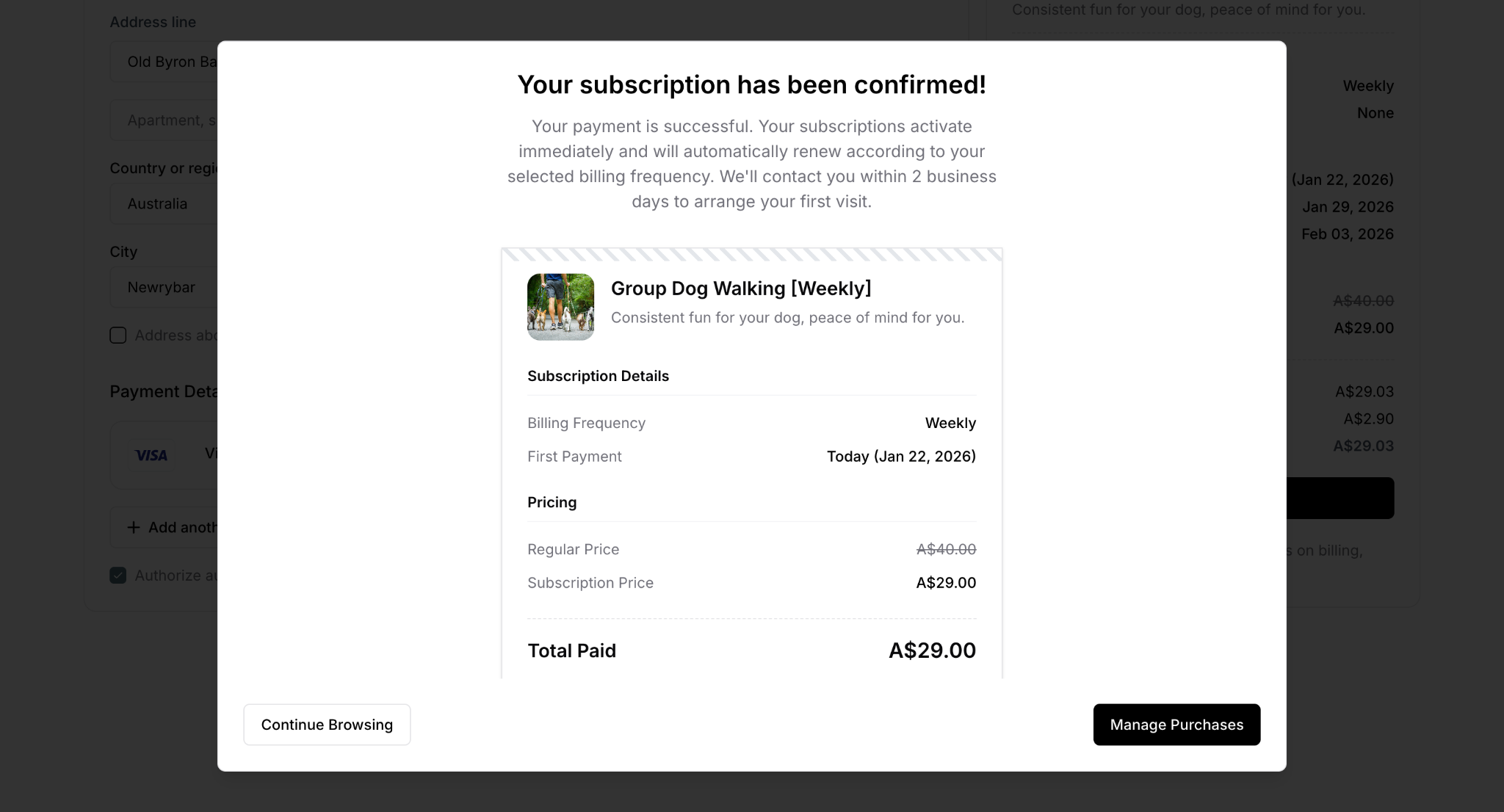
Completing the purchase:
Customer clicks "Confirm Subscription" button
First payment processes immediately upon confirmation
Subscription activates instantly, creating their account
Customer receives confirmation emails
✅ BEST PRACTICE: Keep checkout simple. The fewer steps and fields, the higher your conversion rate. This applies to both subscriptions and one-off purchases.
Stage 4: Onboarding
After completing checkout, customers immediately receive confirmation emails welcoming them and providing important subscription information.
Immediate Confirmation Emails
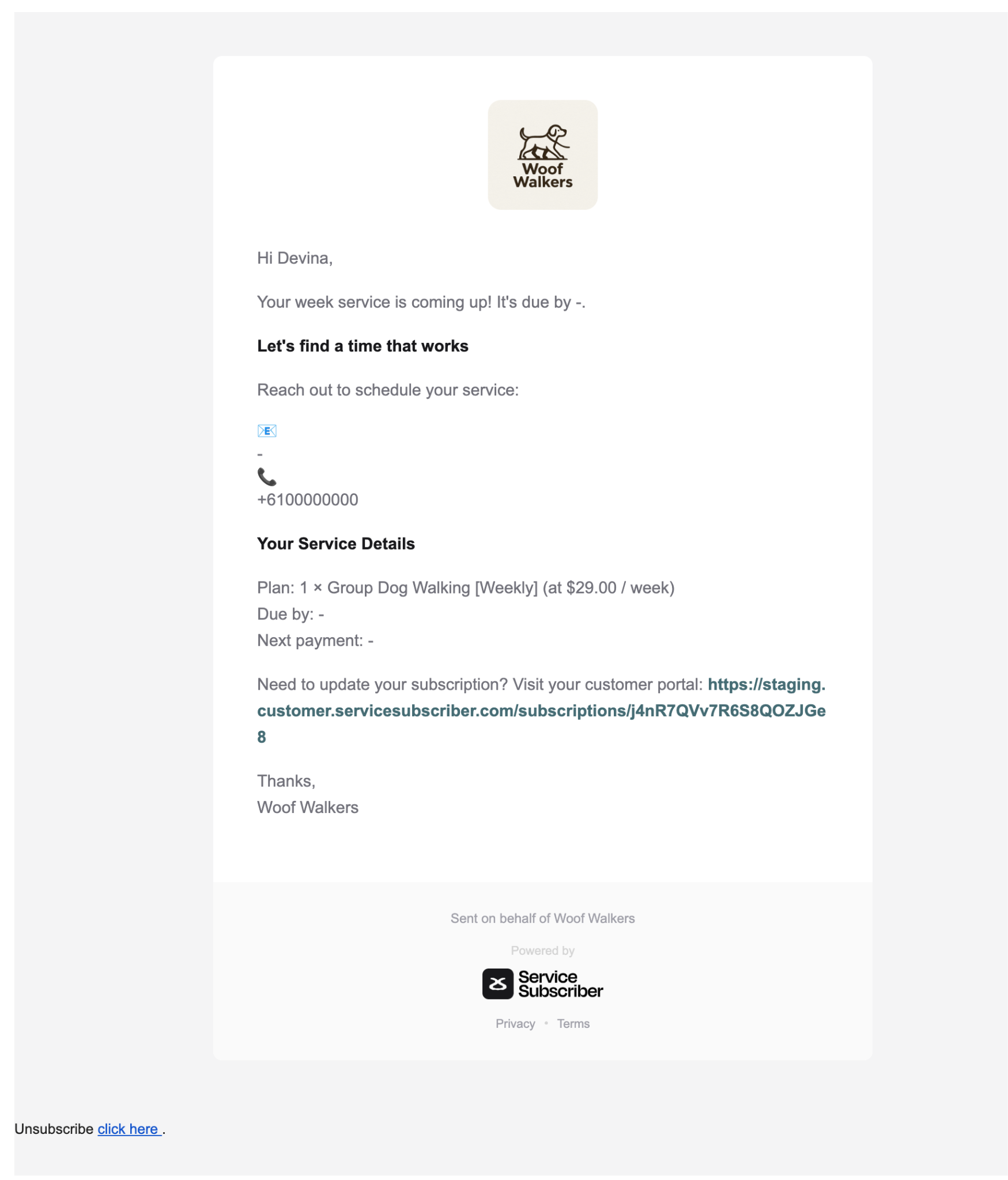
The system automatically sends a welcome email within minutes of subscription completion to confirm details and set expectations.
What the confirmation email contains:
Personalized greeting with customer's name
Service reminder with next due date
Your business contact information for scheduling
Complete service details (plan, pricing, frequency)
Next payment date
Customer portal link for self-service management
Business signature and contact details
✍️ TIP: This confirmation email serves multiple purposes: welcomes the customer, provides your contact information for scheduling, displays their service details, and gives them access to their customer portal for self-service management.
Accessing payment receipts: Customers can view and download payment receipts through their customer portal at any time. Receipts are not automatically emailed—customers access them via the portal link provided in the confirmation email.
✅ BEST PRACTICE: The welcome email sets the tone for your customer relationship. Make sure your business contact information is current so customers can easily reach you to schedule their first service.
Business Owner Notification
You receive automatic notification: New subscriber alert email with customer name and contact details, service they subscribed to, subscription start date, and payment confirmation showing first charge processed successfully.
Customer Portal Access
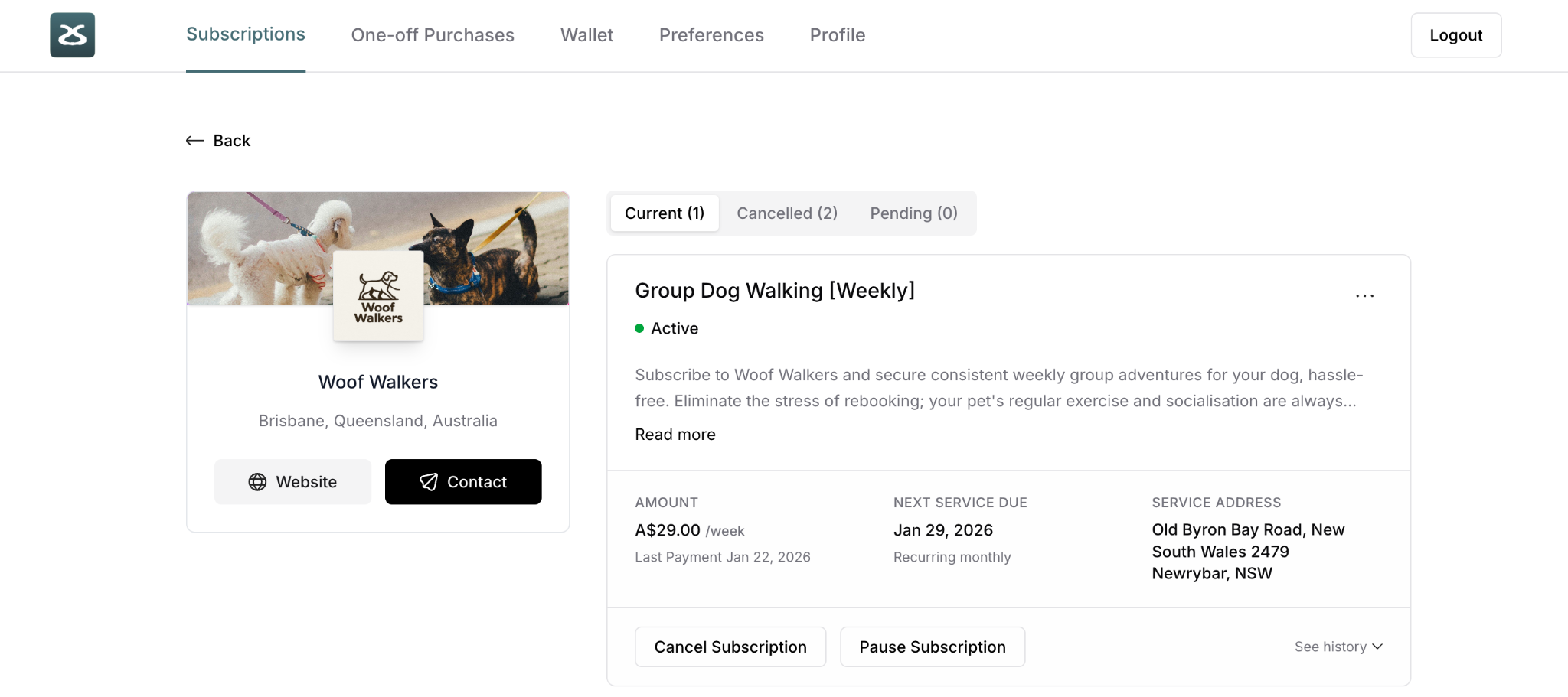
Customers can immediately log into their customer portal to:
View complete subscription details
Manage payment methods and update cards
Schedule or reschedule services (if enabled)
Update account information and addresses
Pause subscription (if you've enabled this)
Cancel subscription (after minimum term, if you've enabled auto-refund)
Stage 5: Ongoing Service
Once subscribed, customers enter the ongoing service cycle with automatic scheduling, delivery, and billing.
Note: This stage is subscription-specific. One-off purchase customers receive a single service delivery and no ongoing cycle.
Service Reminders
Before each service:
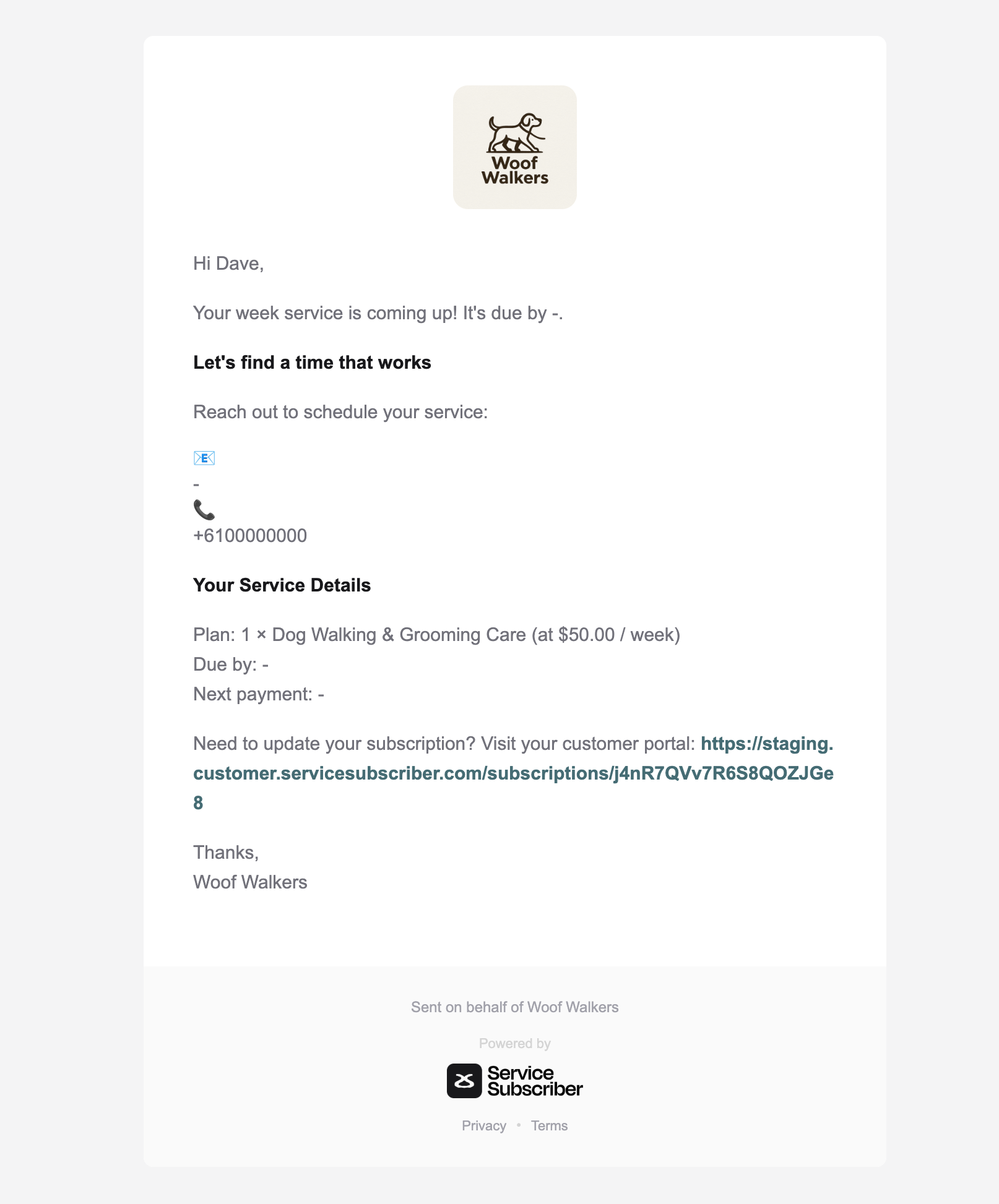
Automated reminder email sends 24-48 hours ahead showing:
Upcoming service date
Time window for arrival (if specified)
Preparation instructions if needed
Your contact information
Service Delivery
On service day:
You perform the service as scheduled
Customer receives service (whether home or not)
You mark service complete in your Delivery dashboard afterward
Service Completion
After marking complete:
Customer receives service completion email:
Confirms work was done
Any notes about the service
Thank you message
Note: The next service has already been created when payment was successfully processed (see Automatic Billing below).
Automatic Billing
On billing date (which is the same as service due date):
Example timeline: Weekly subscription every Wednesday
Wednesday, Jan 7: Payment processes for Jan 7 service
If payment succeeds: Jan 14 service immediately created in system
You deliver: Jan 7 service anytime before Jan 14
Wednesday, Jan 14: Payment processes for Jan 14 service
If payment succeeds: Jan 21 service immediately created
And so on...
The automatic billing cycle:
Payment processes automatically on service due date using saved payment method
Customer receives receipt immediately
Next service immediately created upon successful payment
Next payment scheduled based on subscription frequency (7 days for weekly, 14 for fortnightly, etc.)
If payment succeeds:
Everything continues smoothly with no action required
Next service already created in system and appears in your Delivery dashboard
Customer history updates automatically
Billing cycle continues
If payment fails:
Customer is notified immediately to update payment method
Next service is NOT created (prevents service backlog)
System makes automatic retry attempts
You're notified of payment failure
Service may pause if payment isn't resolved quickly
No services scheduled until payment succeeds
⚠️ IMPORTANT: Services are only created when payment succeeds. This means if a customer's payment fails, you won't have upcoming services piling up in your Delivery dashboard—the cycle simply pauses until payment is resolved.
✍️ TIP: Most subscription cancellations happen due to failed payments, not service dissatisfaction. Make payment updates easy through the customer portal to prevent unnecessary churn.
How this protects your business:
You never deliver service without payment
Failed payments stop scheduling immediately
No service backlog from non-paying customers
Clear dashboard showing only paid services
Subscription Management
Throughout their subscription, customers can manage their account through the customer portal.
What Customers Can Do
Manage subscription:
View subscription details and history
Update payment method
Change service address
Update contact information
Pause subscription (if you've enabled this feature)
Cancel subscription (after minimum term is met)
View information:
Upcoming services scheduled
Past services completed
Payment history and receipts
Next billing date
Subscription terms
Communication preferences:
Opt in/out of marketing emails
Manage notification preferences
Update contact details
✍️ TIP: The customer portal reduces your administrative work by letting customers handle routine updates themselves. Encourage customers to use it by including the portal link in all communications.
Optimizing the Subscription Journey
Best Practices for Each Stage
Discovery:
Make your live site URL easy to find and share
Use multiple discovery channels (QR codes, social media, direct invitations)
Track which channels drive the most subscribers
Selection:
Display clear pricing for both subscription and one-off options
Show subscription savings prominently
Use high-quality images and detailed descriptions
Keep terms simple and customer-friendly
Checkout:
Minimize form fields to reduce friction
Make the process mobile-friendly
Display subscription summary clearly before final confirmation
Ensure payment processing is smooth and reliable
Onboarding:
Send confirmation email immediately
Provide clear next steps
Make it easy to contact you for scheduling
Set expectations for first service delivery
Ongoing:
Send timely service reminders
Mark services complete promptly
Communicate proactively about any issues
Make the customer portal accessible and easy to use
Respond quickly to payment failures
✅ BEST PRACTICE: Each stage of the journey is an opportunity to build trust and demonstrate value. Focus on clear communication, smooth processes, and excellent service delivery to maximize retention and reduce churn.
✍️ TIP: The subscription journey doesn't end after the first service—it's an ongoing relationship. Consistently excellent service delivery is what keeps subscribers long-term and generates referrals.
Was this article helpful?
That’s Great!
Thank you for your feedback
Sorry! We couldn't be helpful
Thank you for your feedback
Feedback sent
We appreciate your effort and will try to fix the article