Service analytics and activity tracking help you understand how your services perform, which offerings attract customers, and where to focus your business growth efforts.
This guide explains how to monitor service performance and use activity data to make better business decisions.
Accessing Service Data
Services Page Overview
View key metrics at the top of your Services page:
Summary metrics:
All Services: Total count of all services you've created (active and draft)
Active: Currently live and available for customers to purchase (subscriptions or one-off)
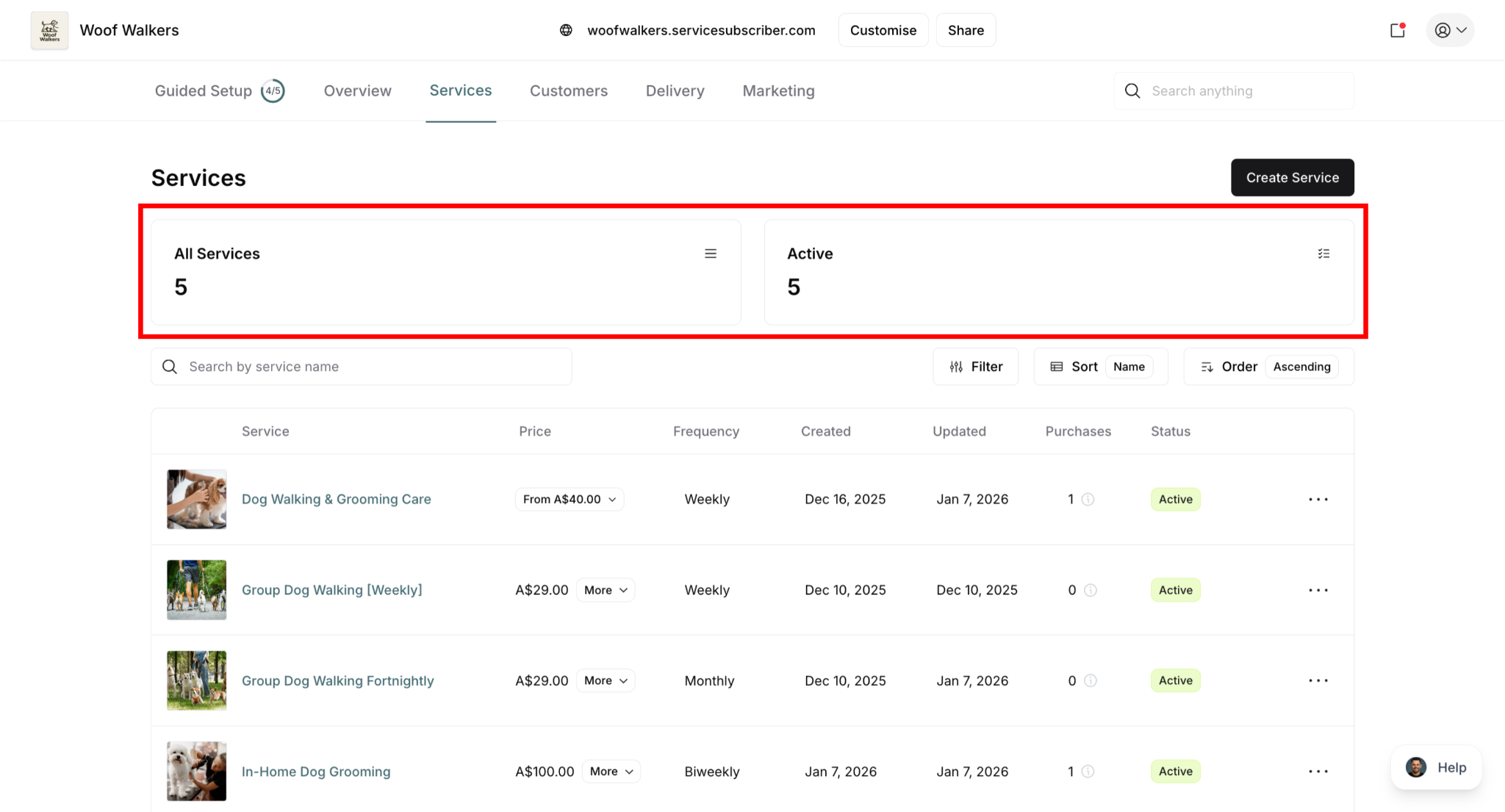
✍️ TIP: If your Active count is lower than All Services count, you have unpublished draft services. Review and publish them to start generating revenue, or delete drafts you no longer need.
What these numbers mean:
All Services = Active: All your services are published and generating revenue
All Services > Active: You have draft services or services with "Show on live site" unchecked
Active = 0: No services are currently visible to customers—publish services to start accepting purchases
Individual Service View
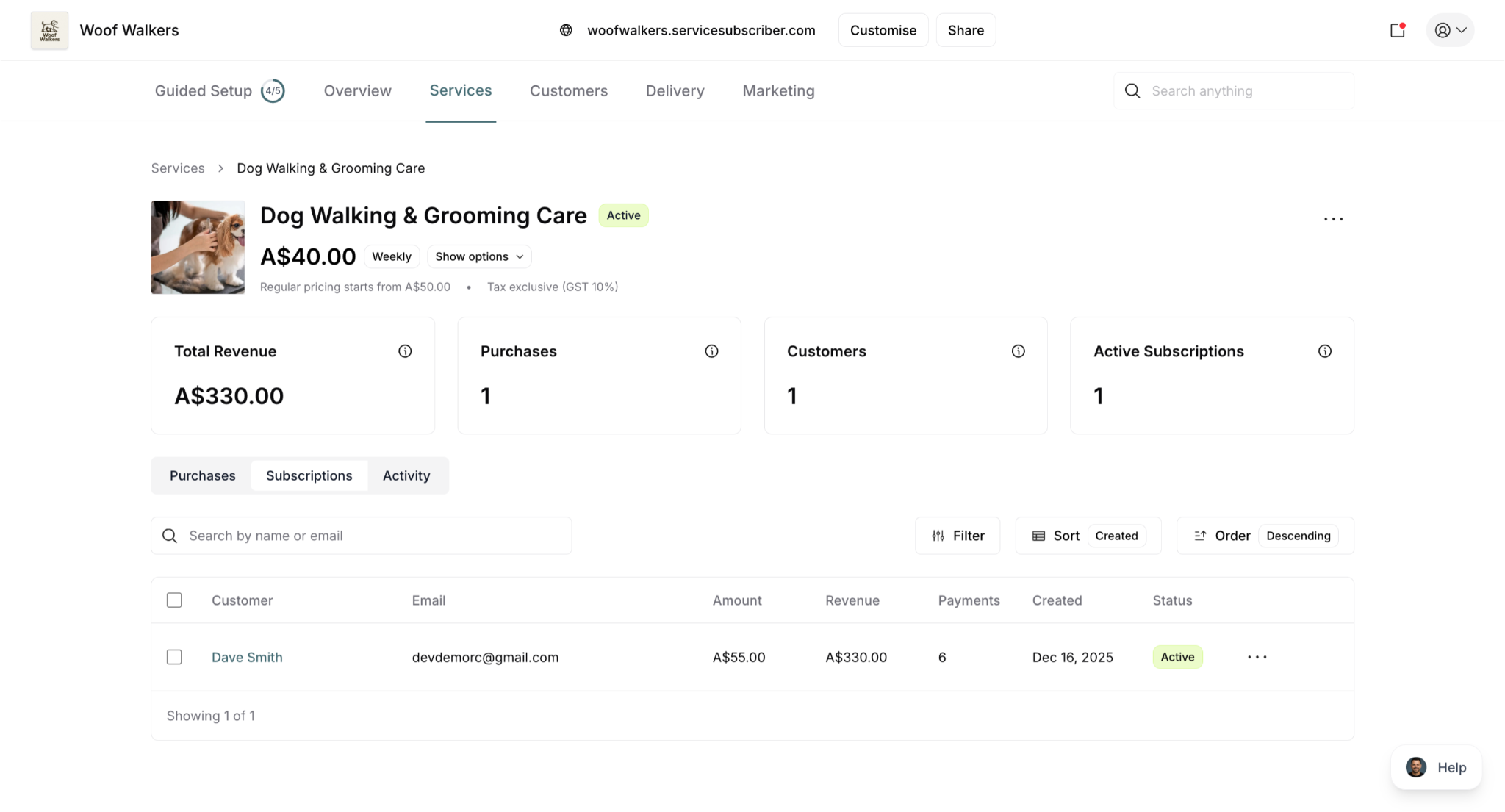
Click any service to see detailed information:
Service header shows:
Service name and Active status badge
Service image thumbnail
Subscription price and frequency (e.g., A$40.00 Weekly)
"Show options" dropdown for pricing details
Regular pricing information (e.g., "Regular pricing starts from A$50.00")
Tax treatment (e.g., "Tax exclusive (GST 10%)")
Action menu (⋯) for quick access
Four key metrics displayed:
Total Revenue: Total earnings from all sources (subscriptions and one-off purchases)
Purchases: Total number of one-off purchases made at regular price
Customers: Total unique customers (both one-off purchasers and subscribers, active and inactive)
Active Subscriptions: Number of currently active subscribers being billed and receiving service
Available tabs:
Purchases: View one-off purchases only
Subscriptions: View subscription purchase details
Activity: Service history and timeline
Key Service Metrics
Understanding Service Metrics
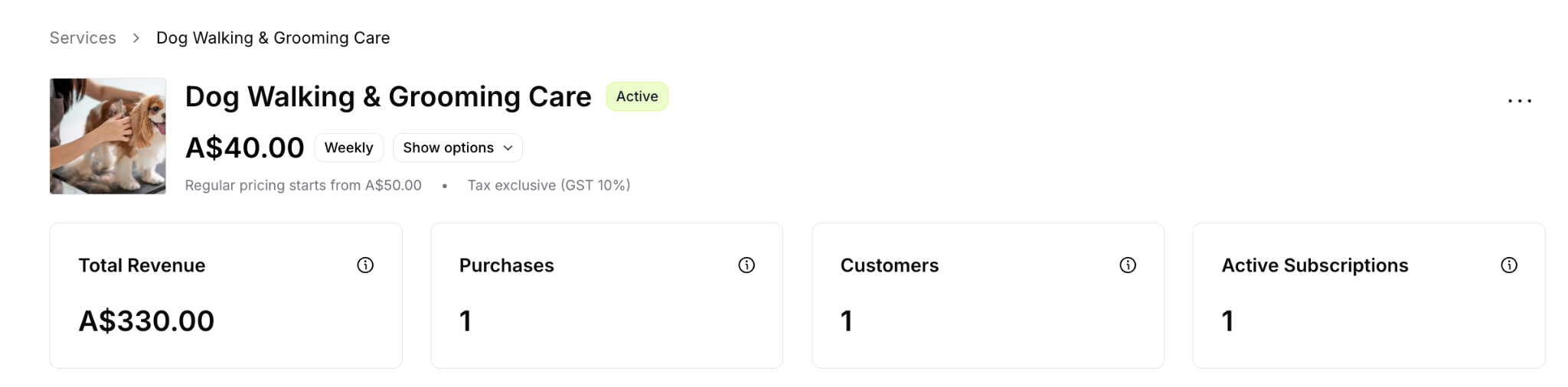
Understanding Service MetricsYour service detail page displays four key metrics that help you track performance and growth at a glance.
Total Revenue
What it shows: The total revenue generated from this service since creation, including both subscription payments and one-off purchases.
Where to find it: Service detail page, displayed as the first metric card at the top.
What it means:
Higher revenue = more successful service
Tracks total earning power of this service offering
Shows combined value from all purchase types
Helps identify your most profitable services
Cumulative total since service was created
Example: If you have 5 active subscribers at $40/month who've each paid twice ($400 total) plus 3 one-off purchases at $50 each ($150), your total revenue would be $550.
✍️ TIP: Compare total revenue across services to identify which offerings generate the most income overall, regardless of purchase type or customer count.
Purchases
What it shows: The total number of one-off purchases made at regular price without subscribing (all-time count since service creation).
Where to find it: Service detail page, displayed as the second metric card.
What it means:
Interest in trying your service without committing
Potential subscription conversion opportunity
Shows if regular pricing is acceptable
Indicates one-time purchase demand
Only counts one-off purchases (subscriptions tracked separately)
Conversion opportunity:
One-off purchasers are warm leads for subscription conversion:
They've already tried your service
They know your quality
Follow up to encourage subscribing
Offer incentive to convert to subscription
Example scenarios:
High purchases, low active subscriptions:
Customers prefer flexibility over commitment
Subscription value proposition unclear
Consider highlighting subscription savings more
May need to improve service quality for retention
Low purchases, high active subscriptions:
Strong subscription model
Customers see clear value in committing
Price difference effectively encourages subscriptions
Service likely has high quality or necessity
Both low:
Service needs more visibility or marketing
Pricing may be too high for market
Service offering may not match customer needs
✍️ TIP: If one-off purchases significantly outnumber active subscriptions, increase the "Show subscription savings" visibility or widen the price gap between regular and subscription pricing to better incentivize subscriptions.
Customers
What it shows: The total number of unique customers who have ever purchased this service in any form, including current active subscribers, paused or cancelled subscribers, and one-off purchasers (both active and inactive).
Where to find it: Service detail page, displayed as the third metric card.
What it means:
Total reach of this service
Higher count = broader customer base
Includes both recurring and one-time customers
Shows overall service adoption
Counts each person once, regardless of purchase history
Example: If you have 8 active subscribers, 3 cancelled subscribers, and 2 people who made one-off purchases, your customer count would be 13.
✅ BEST PRACTICE: Track the ratio of active subscriptions to total customers. A high ratio means good conversion and retention. A low ratio suggests many customers try once but don't subscribe or have cancelled.
Active Subscriptions
What it shows: The number of currently active subscribers for this service who are being billed on their schedule and receiving service delivery.
Where to find it: Service detail page, displayed as the fourth metric card.
What it means:
Your current recurring customer base
Predictable revenue stream
Higher count = more stable income
Core measure of subscription business health
Excludes paused, cancelled, or pending subscriptions
Calculate Monthly Recurring Revenue (MRR):
Formula: Active subscriptions × Subscription price = MRR
Example:
Service: Weekly dog walking at $40/week
Active subscriptions: 15
Weekly recurring revenue: 15 × $40 = $600/week
Monthly recurring revenue: $600 × 4.33 = $2,598/month
Growth tracking:
Steady increase = strong service-market fit
Flat numbers = investigate service quality or marketing
Declining count = address cancellations urgently
Zero subscriptions = needs immediate attention
✅ BEST PRACTICE: Track active subscription count weekly. Consistent growth over time indicates a successful, sustainable service. Set growth goals and monitor progress.
Analyzing Your Service Metrics Together
Healthy Service Indicators
Growing active subscriptions: Steady month-over-month increase
High subscription-to-customer ratio: Most customers who try become subscribers (60%+ is good)
Balanced purchase types: Healthy combination of one-off purchases and subscriptions
Increasing total revenue: Both subscriber growth and retention working well
Warning Signs to Investigate
High customers, low active subscriptions: Many cancellations or poor conversion from one-off to subscription
Many one-off purchases, few subscriptions: Customers don't see subscription value or commitment is too high
Flat or declining active subscriptions: Cancellations outpacing new signups
Zero in all metrics: Service visibility issue, pricing problem, or market fit concern
Example analysis:
Service: Monthly house cleaning
Total Revenue: $12,500
Purchases: 27 (one-off)
Customers: 45
Active Subscriptions: 18
Interpretation:
27 one-off purchases + 18 active subscriptions = 45 customers
60% chose one-off (27÷45), only 40% are subscribers (18÷45)
Action needed: Subscription value isn't clear enough
Solutions: Increase price gap, highlight savings more, improve service quality to encourage commitment
✍️ TIP: Use the Purchases tab to view all one-off purchase details and the Subscriptions tab to view all subscription details. Comparing these two lists helps you understand customer preferences and optimize your strategy.
✅ BEST PRACTICE: Review all four metrics together weekly. Individual metrics tell part of the story, but analyzing them together reveals the complete picture of your service's health and opportunities for improvement.
Service Activity Tab
Track detailed history and timeline of all events related to your service.
Accessing Activity
Go to Services page
Click on a service
Select Activity tab (next to Subscriptions tab)
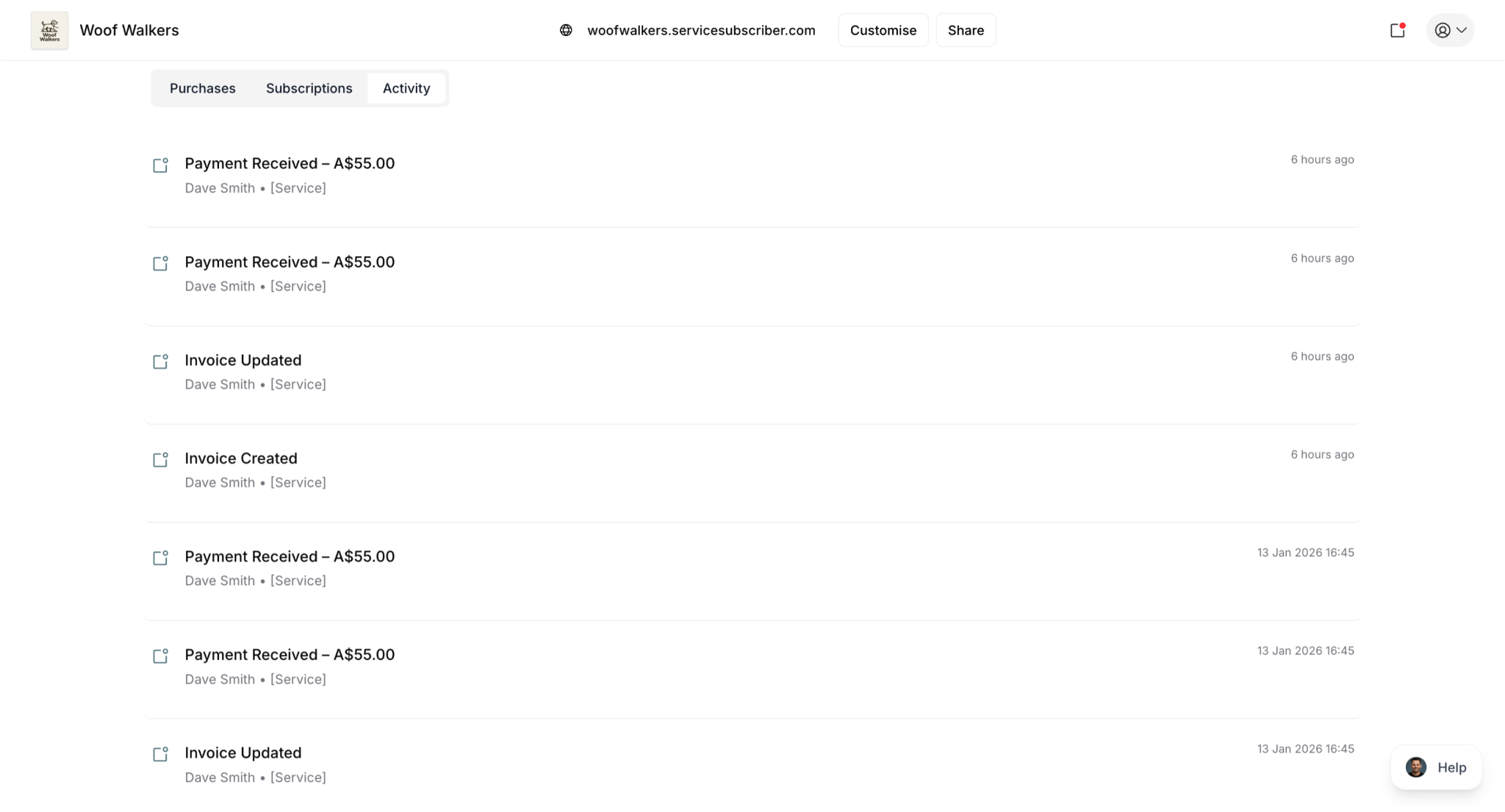
The Activity tab displays a chronological timeline of all events related to this specific service, with the most recent events at the top.
What the Activity Log Shows
Service-level events:
Service activation and creation
Service modifications and updates
Status changes (draft to published, active to inactive)
Customer events:
New subscriptions started
Subscription cancellations
Subscription status changes
Payment events:
Invoices created
Invoices paid
Payment failures
Refunds processed
Each activity entry displays:
Event type and title
Date and time stamp
Customer name (for customer-related events)
Subscription details (service name, pricing, frequency)
Relevant action buttons (Download PDF, Pay Now, View details)
Common Activity Events
Service Activated:
Shown when service is first published and goes live
Indicates service is now available for customers
Includes "View Service" button to see live service page
Example: "A Dog Walking & Grooming Care service has been activated for your business"
Subscription Started:
Records when a new customer subscribes
Shows customer name and subscription ID
Displays which service they subscribed to
Timestamp shows exact subscription date and time
Example: "Dave started a subscription for service Dog Walking & Grooming Care [Weekly]"
Invoice Created:
Shown when a new invoice is generated
Displays customer name and subscription details
Shows invoice amount and frequency
Includes "Pay Now" and "Download PDF" buttons
Example: "A new invoice has been created for Dave"
Invoice Paid:
Records successful payment completion
Shows customer name and payment details
Displays subscription information and amount paid
Includes "Download PDF" button for receipt
Example: "Dave has paid the invoice"
Subscription Cancelled:
Logs when a customer cancels their subscription
Shows customer name and cancellation date
May include cancellation reason if provided
Indicates revenue impact
Service Modified:
Documents changes made to service settings
Shows what was changed and when
Records who made the modification
Tracks service updates over time
Using the Activity Log
Monitor new business:
See new subscriptions in real-time
Track customer onboarding
Celebrate subscription milestones
Track revenue events:
Monitor invoice creation and payment
Identify payment patterns
Download invoices and receipts as needed
Investigate issues:
Review timeline of subscription problems
See when cancellations occurred
Understand customer journey from start to cancellation
Analyze patterns:
When do most subscriptions start?
When do cancellations cluster?
Are there patterns in payment timing?
Which days see the most activity?
Quick actions available:
Download PDF invoices and receipts
Pay outstanding invoices
View service details
Access subscription information
✍️ TIP: Review activity weekly to spot patterns—when do most signups happen? When do cancellations cluster? Are there specific times when payments fail? This reveals optimization opportunities for your business timing and operations.
✅ BEST PRACTICE: Use the activity log to maintain a detailed record of your service's history. This is invaluable for customer support, financial reconciliation, and understanding your business growth over time.
Analyzing Service Performance
Use your service metrics to identify what's working, what needs improvement, and where to focus your efforts.
High-Performing Services
Identifying Success
High-performing services show these indicators:
Steady subscription growth: Month-over-month increase in active subscriptions
Low cancellation rates: Subscribers stay long-term
Healthy purchase mix: Good balance of subscriptions and one-off purchases
Consistently positive feedback: Customers express satisfaction
Operating at or near capacity: Strong demand for your service
What to Do with Winners
Document success factors:
What makes this service attractive?
What pricing strategy works?
What descriptions and images resonate?
What terms and policies work well?
Leverage success:
Use as templates when creating new services
Feature prominently on your live site
Consider price increases due to high demand
Create similar offerings to replicate success
Focus marketing budget on promoting these services
✍️ TIP: Your best-performing services reveal what your market values. Study them carefully to understand customer preferences and replicate success factors in other offerings.
Underperforming Services
Warning Signs
Watch for these indicators of poor performance:
Zero or very few purchases: Little to no customer interest
High cancellation rates: Subscribers don't stay long-term
No growth over time: Flat numbers for extended periods
Low subscription conversion: Many one-off purchases, few subscriptions
Negative customer feedback: Complaints or dissatisfaction
What to Investigate
Review these key areas:
Pricing:
Is pricing competitive with alternatives?
Is the subscription-to-regular price gap compelling?
Are you too expensive or too cheap for perceived value?
Presentation:
Are descriptions clear and compelling?
Do images showcase quality work?
Are purchase options clearly explained?
Terms:
Are subscription terms too restrictive?
Is the minimum commitment too long?
Are policies customer-friendly?
Market demand:
Does actual demand exist for this service?
Are you targeting the right customers?
Is timing or seasonality a factor?
Action Options
Improve:
Add better photos showcasing your best work
Write clearer, more compelling descriptions
Adjust pricing or price gap
Update terms to be more customer-friendly
Reposition:
Target different customer segments
Change value proposition
Adjust purchase options (enable/disable one-off purchases)
Test pricing:
Lower prices to test if demand increases
Widen subscription savings to incentivize subscriptions
Enable one-off purchases to lower entry barrier
Retire:
Uncheck "Show on live site" to hide from new customers
Delete if no subscribers and no improvement after changes
✍️ IMPORTANT: Before retiring a service, ensure all active subscriptions are transitioned or completed. You cannot delete services with active subscribers.
Seasonal Patterns
Tracking Throughout the Year
Monitor these seasonal factors:
Signup patterns:
Which months bring most new customers?
When do subscriptions increase?
When do one-off purchases spike?
Cancellation patterns:
When do cancellations cluster?
Are there predictable pause periods?
What drives seasonal churn?
Revenue fluctuations:
Which months generate highest revenue?
When does revenue typically drop?
How do seasonal changes impact cash flow?
Service delivery peaks:
When is demand highest?
When do you need extra capacity?
When can you reduce resources?
Common Seasonal Patterns
Lawn care:
High spring signups (March-May)
Fall cancellations (September-November)
Revenue peaks in summer months
Pool service:
Summer peaks (May-August)
Winter pauses or cancellations
One-off cleanings in spring for opening
House cleaning:
Steady year-round demand
Slight increase before holidays
Minimal seasonal variation
Snow removal:
Fall signups (September-November)
Winter service delivery
Spring cancellations (March-April)
✍️ TIP: Use historical activity data to predict future patterns. Plan marketing campaigns, pricing adjustments, and capacity allocation accordingly. Prepare for known busy seasons well in advance.
Comparative Analysis
Comparing Your Services
Compare services across your portfolio to understand what drives success and identify improvement opportunities.
By active subscriptions:
Which services attract the most subscribers?
What do popular services have in common?
Can underperforming services learn from winners?
Are subscription terms more favorable on successful services?
By total revenue:
Which generates the most income overall?
What's the balance between price and volume?
Which has the best profit margins?
Are high-revenue services subscription-heavy or one-off-heavy?
By purchase mix:
Which services convert one-off purchasers to subscribers?
Which have mostly subscriptions vs. mostly one-off purchases?
Does the pricing gap effectively incentivize subscriptions?
Are "Show subscription savings" settings optimized?
By growth rate:
Which are growing fastest?
Which are stagnant or declining?
What drives different growth rates?
Are newer services outperforming older ones?
✅ BEST PRACTICE: Create a simple spreadsheet tracking these metrics monthly. Visual trends over time reveal patterns that aren't obvious from single snapshots.
Using Data to Make Decisions
Pricing Adjustments
Use performance data to inform pricing decisions and maximize revenue while maintaining demand.
When to increase prices:
Service is at or near capacity
High demand with low churn
Active subscriptions growing steadily
Value clearly exceeds current price
Your costs have increased
Subscriber limit nearly reached
When to decrease prices:
Zero or very few customers despite marketing
Competition significantly undercuts you
Many one-off purchases but few subscriptions (widen the gap)
You're testing market price sensitivity
Service appears too expensive for perceived value
How to test pricing changes:
⚠️ IMPORTANT: Pricing is locked once customers purchase. You cannot change pricing for existing customers.
Create new service with updated pricing
Uncheck "Show on live site" on old service
Monitor signup rate on new service
Existing customers continue at old pricing
Adjust based on actual results, not assumptions
Capacity Planning
Use subscription counts and purchase data to plan staffing and resource allocation effectively.
Approaching capacity:
Hire additional help to handle demand
Increase prices to slow demand naturally
Enable subscriber limits to cap at your capacity
Add waitlists for interested customers
Expand service hours or days available
Underutilized capacity:
Market more aggressively to fill available slots
Lower prices to test if demand increases
Improve service appeal and positioning
Enable one-off purchases to lower entry barrier
Consider discontinuing if demand doesn't improve
✍️ TIP: Use the "Limit number of subscribers" setting to prevent overbooking. Remember, this only limits subscriptions—one-off purchases remain available, giving you flexibility to accept occasional work without recurring commitment.
Marketing Focus
Allocate marketing resources based on service performance data rather than guesswork.
High performers:
Feature prominently on your live site
Invest advertising budget here
Optimize descriptions and images continuously
Create customer testimonials showcasing results
Highlight subscription savings clearly
Use as examples in all marketing materials
Low performers:
Fix underlying issues first before marketing heavily
Test improvements systematically
Don't waste marketing budget on broken offerings
Improve, then market once performance improves
Retire service if issues are unfixable
Balanced approach:
Allocate 70% of marketing budget to proven winners
Use 20% to improve and test underperformers
Reserve 10% for new service launches
✅ BEST PRACTICE: Let data guide decisions, not assumptions. Services that perform well deserve more attention and investment than those that don't. Review metrics monthly and adjust your focus accordingly.
✍️ TIP: The Purchases and Subscriptions tabs provide detailed customer lists. Use this data to identify patterns—which customers subscribed immediately vs. tried once first? This reveals how customers make purchasing decisions for each service.
Was this article helpful?
That’s Great!
Thank you for your feedback
Sorry! We couldn't be helpful
Thank you for your feedback
Feedback sent
We appreciate your effort and will try to fix the article