Service visibility and status settings control whether services appear on your public site and how they're displayed. Understanding these settings helps you manage what customers see and when services become available for purchase.
Understanding Service Status
Every service has a status that determines its availability:
Active
Active status means your service is live on your public subscription page where customers can view it and purchase immediately (subscribe or make one-off purchase if enabled).

✅ This is your goal: Active services make money. All published services should be Active once Stripe is connected.
Pending
Pending status means your service is created but not yet live, hidden from public view on your subscription page, and cannot accept customer purchases (subscriptions or one-off) while waiting for requirements to be met.
Common reasons for Pending:
Stripe account not connected yet
Service saved as draft
Awaiting activation

⚠️ IMPORTANT: Pending services don't generate revenue. They're invisible to customers and can't accept any purchases (subscriptions or one-off) until activated.
Draft
Draft status means your service is saved but not published yet—it's a work in progress that's not visible to customers while you continue editing and refining the details before making it live.
How to publish:
Edit the draft service
Complete any missing information
Click Publish instead of "Save as Draft"
Service moves to Active (if Stripe connected) or Pending

✍️ TIP: Use Draft status when building services over multiple sessions. Save progress without making the service public.
Archived/Deleted
Archived or deleted status means your service is removed from active offerings and no longer visible to customers, though existing subscription customers typically remain unaffected and continue their subscriptions.

What happens with existing customers:
Subscription customers: Continue receiving service at their original terms
One-off purchases: Already completed transactions remain in records
New purchases: Not available (service is archived/deleted)
⚠️ IMPORTANT: You cannot delete a service with active subscribers.
Service Visibility Controls
Show on Live Site
Control whether your service appears to potential customers on your public subscription page.
Location: Settings tab > Service Visibility section
Default setting: Checked (enabled by default)
When checked (ON): Service appears on your live subscription site, customers can view details and purchase (subscribe or one-off), service is listed in your public catalog, and begins generating revenue from new customers.
When unchecked (OFF): Service is hidden from customer view on your public site, new customers cannot find or purchase it (subscriptions or one-off), existing subscription customers remain unaffected and continue service normally.
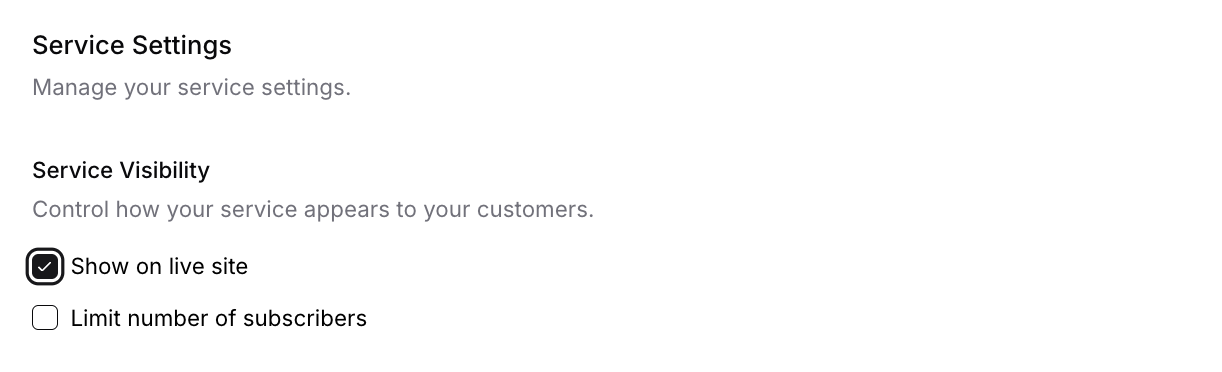
Important: A service can be active (accepting payments, generating schedules for existing subscribers) but hidden from your live site. Unchecking this option only controls public visibility—it doesn't deactivate the service or affect existing subscribers.
✅ BEST PRACTICE: Keep this checked for all services you want customers to see. Uncheck only when hiding old pricing versions, or during testing.
Subscriber Limits and Visibility
Subscriber limits affect when subscription signups become unavailable:
Setting Subscriber Limits
Location: Settings tab > Subscriber Limits
Check Limit number of subscribers
Enter maximum number (e.g., 30)
Save service
What happens at limit:
New subscriptions blocked
One-off purchases remain available (if enabled)
Existing subscribers unaffected
Important: Subscriber limits only apply to subscription purchases, not one-off purchases. If you have both purchase options enabled:
At subscriber limit: Subscriptions unavailable, one-off purchases still available
Below subscriber limit: Both subscriptions and one-off purchases available
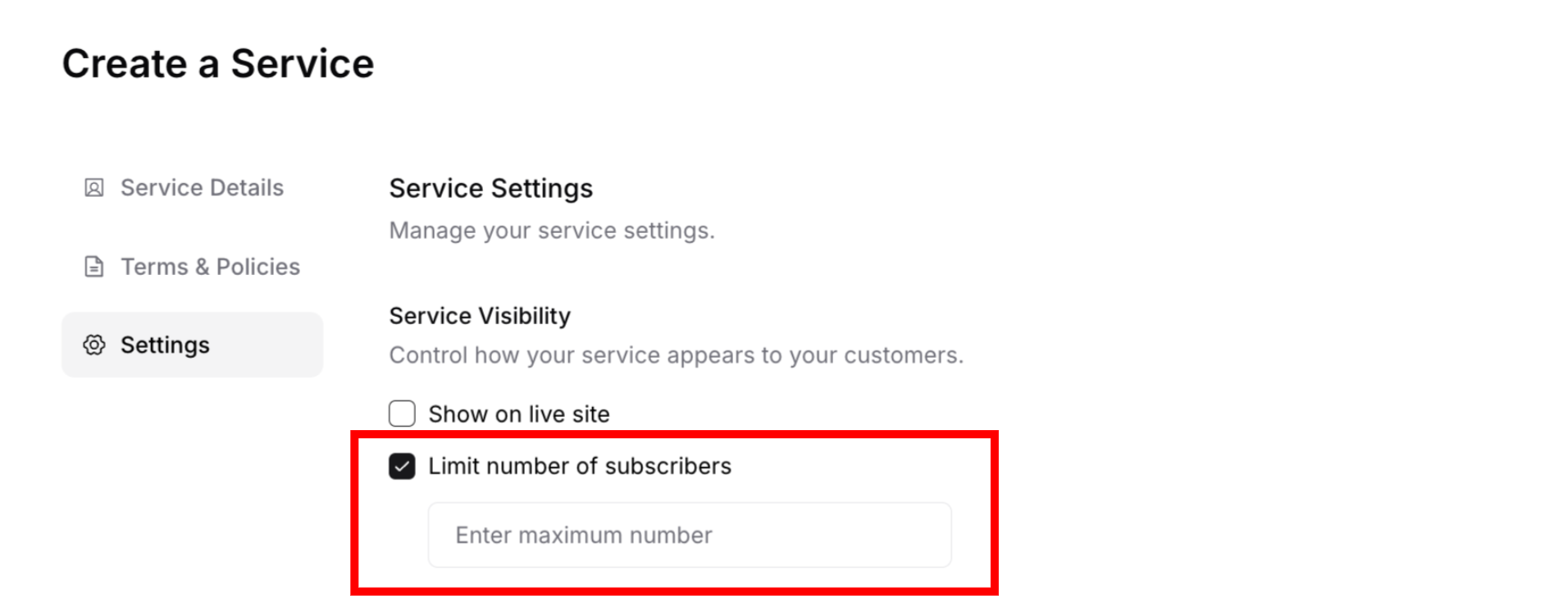
Example:
Service set to 30 subscriber limit
Currently have 30 active subscribers
New customers cannot subscribe (limit reached)
New customers can still make one-off purchases at regular price
✅ BEST PRACTICE: Use subscriber limits to manage committed, recurring workload while still accepting occasional one-off requests. This balances capacity control with revenue opportunities.
What Happens to Existing Subscribers
Understanding how service visibility changes affect your current customers helps you manage services confidently without disrupting existing relationships.
Unchecking "Show on Live Site"
When you uncheck "Show on live site" to hide a service from your public page:
Existing subscription customers:
Keep their active subscriptions unchanged
Continue receiving service on schedule
Billing continues normally at their original price
No disruption to their service delivery
Can still access and manage their subscription in customer portal
Existing one-off purchase customers:
Already completed their transaction
Service delivery continues as scheduled
No impact on past purchases
New customers:
Cannot find or purchase this service (subscriptions or one-off)
Service doesn't appear on your public subscription page
Must wait for you to make it visible again
Can only subscribe if you send them a direct invitation
Cannot make one-off purchases (visibility setting affects all purchase types)
Use case: This is perfect for managing multiple pricing versions. Hide the old service from new customers while existing subscribers continue at their original rate.
Deleting a Service
⚠️ WARNING: Deleting a service is permanent and cannot be undone.
What happens when you delete a service:
If service has NO subscribers or one-off purchases:
Service is permanently removed from your account
No impact on customers (there are none)
Service disappears from your services list
If service HAS active subscribers:
You cannot delete the service
System prevents deletion to protect active subscriptions
You must cancel all subscriptions first, then delete the service
If service has completed one-off purchases:
Past one-off purchases remain in transaction history
Service can be deleted if no active subscribers exist
Historical records are preserved
Recommended approach instead of deleting:
Uncheck "Show on live site" to hide from new customers
Keep existing subscribers on the service
Create a new service with updated details/pricing for new customers
Never delete services with active subscribers
✍️ TIP: Hiding services is almost always better than deleting them. Hidden services preserve your existing customer relationships and historical data while preventing new signups.
Best Practices for Service Changes
✅ Before making major changes:
Review how many active subscribers will be affected
Check if there are completed one-off purchases in the service history
Consider if you need to communicate changes to subscription customers
Decide if hiding (not deleting) is more appropriate
Plan migration strategy if retiring a service completely
✅ When hiding a service:
No communication needed—existing subscribers unaffected
One-off purchases already completed—no impact on past customers
Perfect for phasing out old pricing while keeping existing customers happy
New version can coexist with hidden old version
Both subscription and one-off purchase options become unavailable to new customers
✅ When retiring a service entirely:
Stop accepting new customers (uncheck "Show on live site")
Communicate with existing subscribers about the change
Give advance notice (30+ days recommended)
Offer alternatives or migration to a different service
Only delete after all subscriptions are cancelled
⚠️ IMPORTANT: Always prioritize existing customer experience. Sudden changes or deletions can damage customer trust and create service disruptions. Existing subscribers have ongoing relationships to protect, while past one-off purchase customers have completed their transactions.
✍️ TIP: Instead of deleting services with old pricing, keep them hidden. This maintains existing subscribers at their original rate while you offer new pricing to new customers (both subscriptions and one-off purchases) through a separate, visible service.
Was this article helpful?
That’s Great!
Thank you for your feedback
Sorry! We couldn't be helpful
Thank you for your feedback
Feedback sent
We appreciate your effort and will try to fix the article