Before You Start
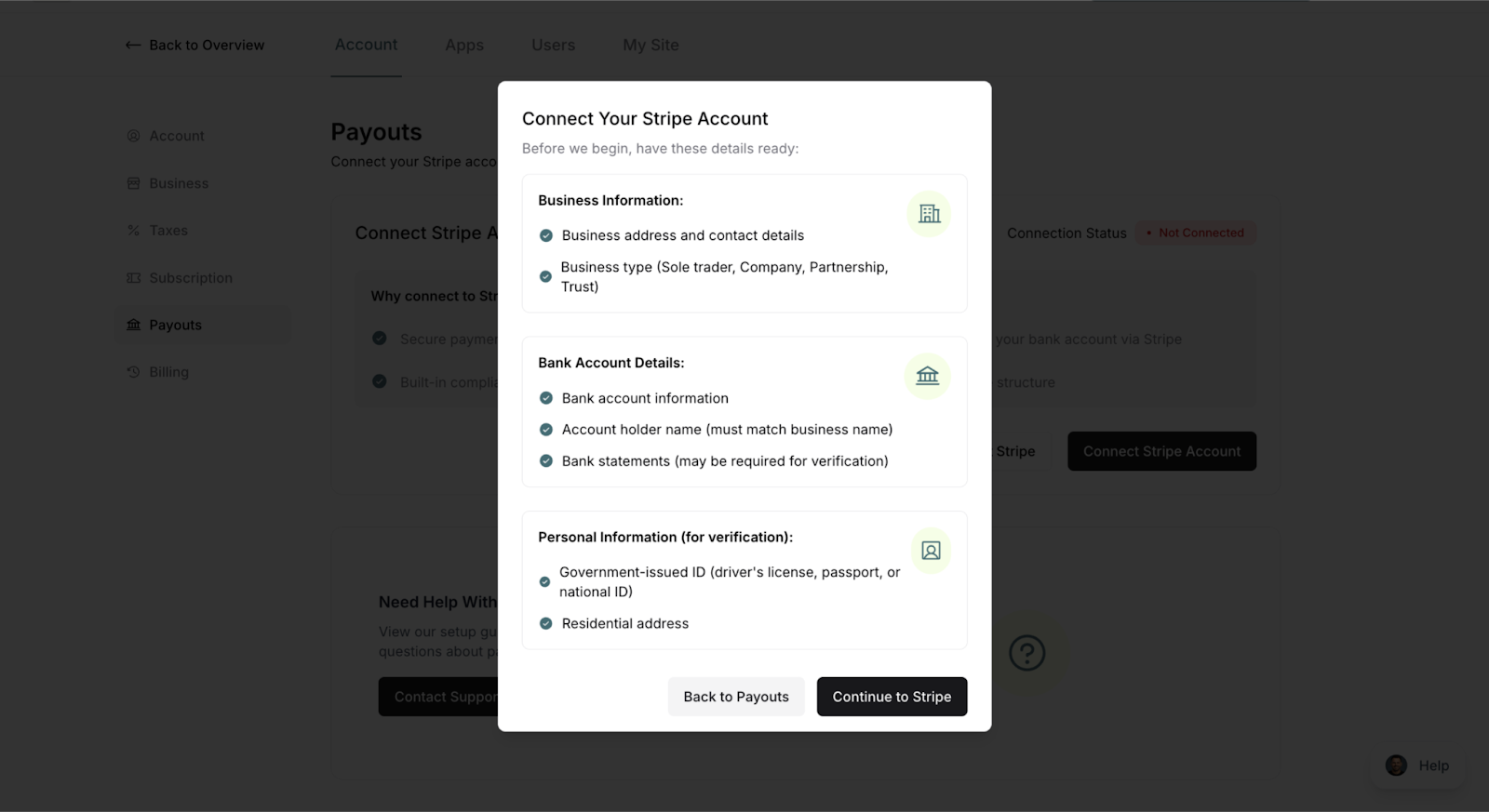
Have these items ready:
✓ Business information
Legal business name
Business address
Tax ID or social security number
Business type (sole proprietor, LLC, etc.)
✓ Bank account details
Bank name
Account number
Routing number
✓ Personal identification
Your date of birth
Your phone number
Your home address
✍️ TIP: If you're a sole proprietor just starting out, you can use your personal information and SSN. You don't need a formal business structure to get started.
Accessing Stripe Connection
There are several ways to connect Stripe:
From Guided Setup
Navigate to your Guided Setup page
Click on Connect your Stripe account (Step 1)
Read the modal explanation
Click Continue or Get Started
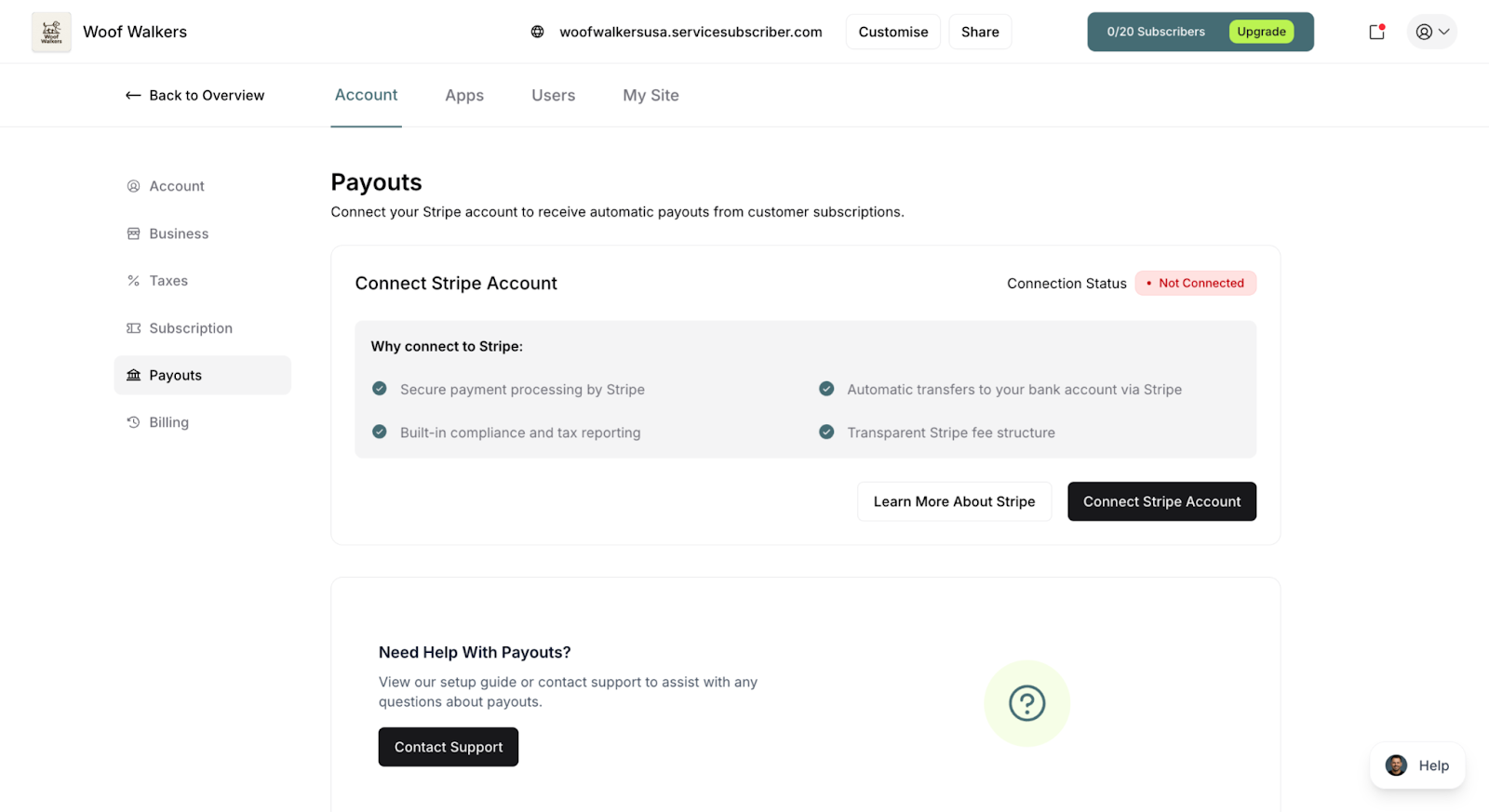
From Payouts Page
Click Payouts in the main navigation
You'll see a Connect Stripe Account button
Click the button to begin
From Banners
You'll also see connection prompts on:
Services page
Customers page
When trying to publish a service
Simply click any Connect Stripe button to begin.
The Connection Process
Step 1: Redirect to Stripe
Click Connect Stripe Account
ServiceSubscriber redirects you to Stripe's secure platform
You'll see Stripe's onboarding interface
⚠️ IMPORTANT: Don't close the browser window during this process. ServiceSubscriber needs to redirect you back after completion.
Step 2: Create or Log In to Stripe
If you're new to Stripe:
Click Create an account
Enter your email address
Create a secure password
Verify your email
If you have a Stripe account:
Click Sign in
Enter your Stripe login credentials
Select the account to connect
✍️ TIP: Use an email address you check regularly. Stripe sends important notifications about payments, payouts, and account updates.
Step 3: Complete Business Information
Stripe will ask for details about your business:
Business Details:
Legal business name
Business type (individual, company, etc.)
Business address
Industry/business category
Website (optional)
Personal Information:
Your legal name
Date of birth
Home address
Phone number
Tax ID or SSN
✅ BEST PRACTICE: Enter information exactly as it appears on official documents. Discrepancies can delay verification and payouts.
Step 4: Add Your Bank Account
This is where Stripe will deposit your money:
Select your Country
Choose your Currency
Enter Account holder name
Enter Routing number (US) or equivalent
Enter Account number
Confirm the details
✍️ TIP: Double-check your bank account number. An incorrect number means delayed payouts and potential fees to correct.
Step 5: Verify Your Identity
Stripe may ask for additional verification:
Common requirements:
Photo ID (driver's license, passport)
Business documentation (if applicable)
Additional address verification
Why verification matters:
Prevents fraud
Ensures secure payouts
Complies with financial regulations
Protects your business
⚠️ IMPORTANT: Complete all verification steps promptly. Incomplete verification can delay your ability to receive payouts.
Step 6: Review and Submit
Before submitting:
Review all information for accuracy
Read Stripe's terms of service
Accept the Stripe Connected Account Agreement
Click Submit or Finish
Step 7: Redirect Back to ServiceSubscriber
After completion:
Stripe automatically redirects you back to ServiceSubscriber
You'll see a success message
Your dashboard shows "Connected" status
✨ Success! Your Stripe account is now connected and ready to process payments.
Was this article helpful?
That’s Great!
Thank you for your feedback
Sorry! We couldn't be helpful
Thank you for your feedback
Feedback sent
We appreciate your effort and will try to fix the article