Sometimes issues arise with Stripe connections, payment processing, or payouts. This guide helps you quickly identify and resolve the most common Stripe-related problems.
Most issues can be fixed in just a few minutes with the right approach.
Connection Issues
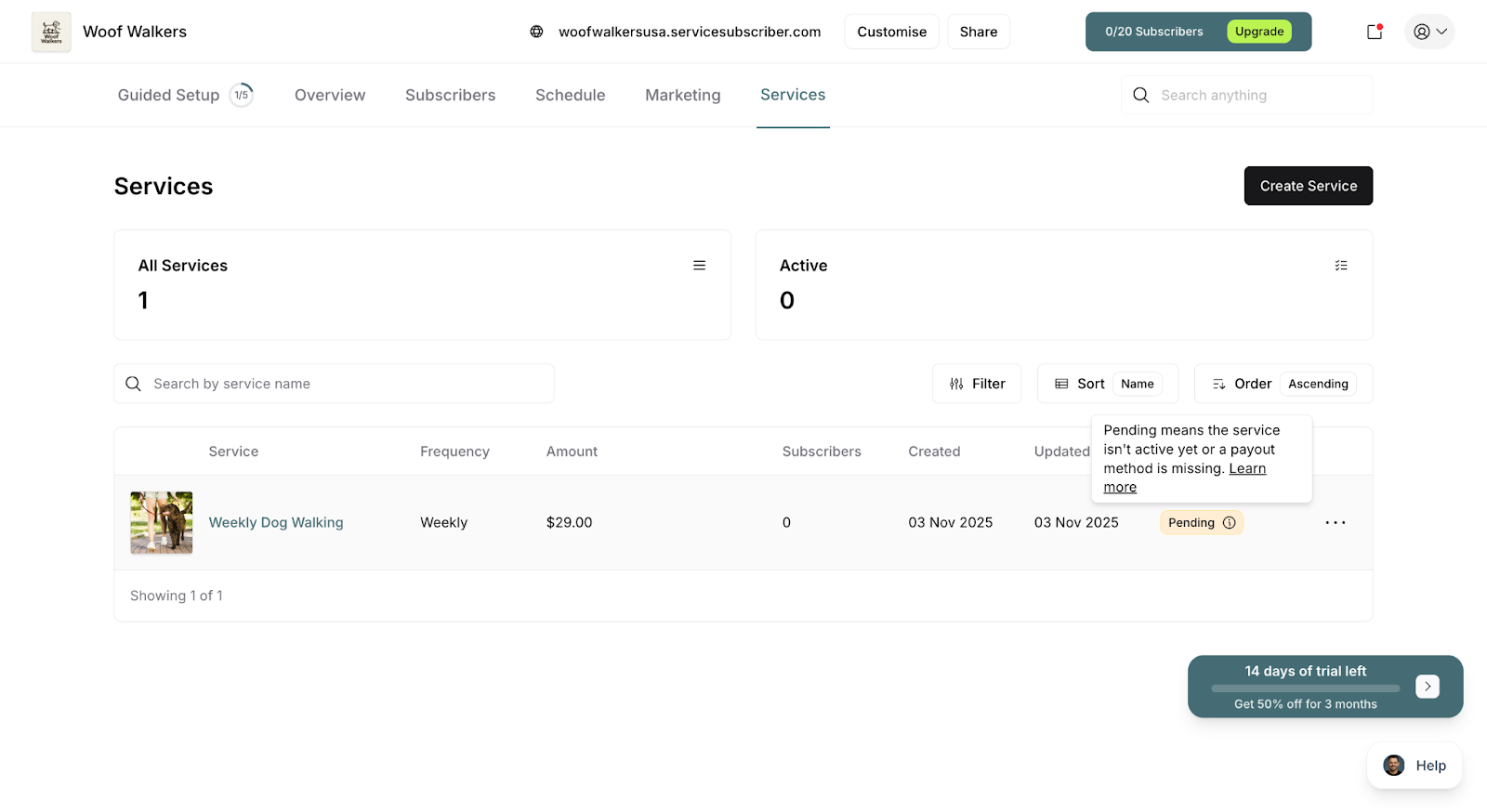
Services Still Show "Pending" After Connecting Stripe
Problem: Your services remain inactive even though you've connected Stripe.
Solution 1: Refresh your browser page
Press F5 or click the refresh button
Wait 10 seconds for status to update
Solution 2: Verify connection status
Go to Payouts page
Confirm "Connected" status displays
Check that your business name appears correctly
Solution 3: Manually activate services
Navigate to Services
Click on each pending service
Click Publish or Make Changes
Save the service
Solution 4: Check Stripe account verification
Log in to stripe.com
Ensure your account is fully verified
Complete any pending verification steps
✍️ TIP: If services don't activate within 5 minutes of connecting Stripe, try logging out of ServiceSubscriber completely and logging back in.
"Connect Stripe" Prompts Still Appearing
Problem: Banners and prompts to connect Stripe remain even after connection.
Solution 1: Clear browser cache and cookies
Go to browser settings
Clear browsing data
Reload ServiceSubscriber
Solution 2: Check actual connection status
Go to Payouts page
If it shows "Not Connected," your connection didn't complete
Restart the connection process
Solution 3: Try a different browser
Connection state might not have synced
Chrome or Firefox recommended
Log in and check status
Stripe Redirect Loop
Problem: You keep getting redirected between ServiceSubscriber and Stripe.
Solution 1: Disable pop-up blockers
Allow pop-ups for servicesubscriber.com and stripe.com
Retry the connection
Solution 2: Use a different browser
Try Chrome, Firefox, or Safari
Ensure browser is up to date
Solution 3: Clear all cookies
Clear cookies for both domains
Start connection process fresh
Solution 4: Disable browser extensions
Turn off ad blockers and privacy extensions temporarily
Retry connection
⚠️ IMPORTANT: Don't close browser windows during the Stripe connection process. Let the redirect complete naturally.
Payment Processing Issues
Customer Payments Failing
Problem: Customers report their payments won't go through.
Solution 1: Verify Stripe account is active
Log in to stripe.com
Check for account restrictions or holds
Complete any required actions
Solution 2: Check card requirements
Some cards require 3D Secure authentication
Ensure customer completes all verification steps
Try a different payment method
Solution 3: Review payment settings in Stripe
Log in to Stripe dashboard
Go to Settings > Payment methods
Ensure required payment types are enabled
Solution 4: Test with Stripe test card
Use test card: 4242 4242 4242 4242
Expiry: any future date
CVC: any 3 digits
If test works, issue is with customer's actual card
✍️ TIP: Most payment failures are due to insufficient funds, expired cards, or bank security blocks. Have customers contact their bank to authorize the transaction.
Specific Payment Error Messages
"Card Declined"
Customer's bank rejected the charge
Customer should contact their bank
Try a different card
"Insufficient Funds"
Not enough money in customer's account
Customer needs to add funds or use different card
"Card Expired"
Card expiration date has passed
Customer needs to update payment method
"Card Not Supported"
Card type not accepted (some prepaid cards)
Try a different payment method
"Authentication Required"
3D Secure verification needed
Customer should complete authentication in their bank's app/website
"Processing Error"
Temporary Stripe or bank issue
Wait 5 minutes and retry
If persists, contact Stripe support
Subscription Payments Not Processing Automatically
Problem: Recurring charges aren't happening on schedule.
Solution 1: Check subscription status
Go to Customers
Click on the customer
Navigate to the Subscriptions tab
Verify subscription shows "Active" status
Check next payment date is set
Solution 2: Verify Stripe webhooks are working
Log in to stripe.com
Go to Developers > Webhooks
Check for ServiceSubscriber webhook
Ensure it shows "Enabled" status
Solution 3: Review failed payment history
In Stripe dashboard, check Payments
Look for failed automatic charges
Review failure reasons
Solution 4: Check customer's payment method
Expired cards won't process
Instruct customer to update payment method in their portal
✅ BEST PRACTICE: Enable email notifications in Stripe for failed payments so you're immediately aware of billing issues.
Note: This troubleshooting applies specifically to subscription payments. One-off purchases are paid immediately at time of purchase and don't have recurring payment issues.
Payout Issues
Payouts Not Arriving in Bank
Problem: Expected payouts haven't reached your bank account.
Solution 1: Verify payout timeline
First payout: 7-14 days after first transaction
Regular payouts: 2-7 business days after initiation
Weekends and holidays don't count
Solution 2: Check payout status
Go to Payouts in ServiceSubscriber
Look for status: Pending, In Transit, or Paid
If "In Transit," funds are on the way
Solution 3: Verify bank account details
Log in to stripe.com
Go to Settings > Bank accounts
Confirm account number and routing number are correct
Solution 4: Contact your bank
Verify they accept ACH transfers (or local equivalent)
Check for any holds or restrictions
Confirm no recent account changes
Payout Shows "Failed" Status
Problem: Payout failed to reach your bank account.
Solution 1: Check bank account details in Stripe
Log in to stripe.com
Go to Settings > Bank accounts
Verify all details are accurate
Update if needed
Solution 2: Verify account is active
Ensure bank account hasn't been closed
Confirm account accepts deposits
No restrictions or holds
Solution 3: Use a different bank account
Add a new bank account in Stripe
Set it as default for payouts
Stripe will retry the failed payout
Solution 4: Contact Stripe support
Provide payout ID
Ask for specific failure reason
Follow their guidance to resolve
✍️ TIP: Failed payouts automatically retry once you fix the underlying issue. The funds aren't lost—they'll transfer once the problem is resolved.
Payout Amount Is Wrong
Problem: Payout is smaller or larger than expected.
Solution 1: Check for refunds
Refunds issued reduce your payout (both subscription and one-off purchase refunds)
Review refund history in Stripe
Confirm refunds were intentional
Check if automatic refunds were triggered by cancellations (if that setting is enabled)
Solution 2: Review fee calculations
Remember Stripe processing fees (~2.9% + 30¢ per transaction)
ServiceSubscriber transaction fees (2% on Starter or 1% on Growth)
Both fees apply to all payments (subscriptions and one-off purchases)
Both are deducted before payout
Example calculation:
Customer pays $100 (subscription or one-off)
Stripe fee: ~$3.20
ServiceSubscriber fee (Starter): $2.00
Your payout: ~$94.80
Solution 3: Check for failed payments
Failed charges don't contribute to payouts
Review customer payment history for failures
Address any payment failures promptly
Failed payments can be from subscriptions or one-off purchase attempts
Solution 4: Look for disputes or chargebacks
Customer disputes reduce payouts
Check Stripe dashboard under Disputes
Respond to disputes with evidence
Disputes can occur on both subscription payments and one-off purchases
Solution 5: Verify your payout period
Check which transactions are included in this payout
Based on your payout schedule (daily, weekly, monthly) set in Stripe
Compare transaction dates to payout period
Include both subscription payments and one-off purchases in your calculations
Solution 6: Account for both revenue types
Calculate expected revenue from subscriptions for the period
Add expected revenue from one-off purchases
Subtract fees from total expected revenue
Compare to actual payout amount
Example:
Subscription payments: $2,000
One-off purchases: $500
Total revenue: $2,500
Minus Stripe fees (~$75)
Minus ServiceSubscriber fees (2%): $50
Expected payout: ~$2,375
✍️ TIP: Download your payout statement from Stripe to see the complete breakdown of all transactions, fees, and adjustments. This shows exactly which subscription payments and one-off purchases contributed to each payout.
Account Verification Issues
Stripe Requesting Additional Information
Problem: Stripe has restricted your account pending verification.
Solution 1: Complete verification immediately
Log in to stripe.com
Look for verification prompts
Provide requested documents promptly
Solution 2: Common verification requests
Photo ID (driver's license, passport)
Business documentation (if applicable)
Proof of address
Bank statement
Tax documents
Solution 3: Ensure documents are clear
High-quality scans or photos
All corners visible
Text is readable
Not expired
Solution 4: Follow up on submission
Check email for Stripe updates
Respond to any questions quickly
Verification typically takes 1-3 business days
⚠️ IMPORTANT: Respond to verification requests within the timeframe provided. Delayed responses can result in payout holds or account restrictions.
Identity Verification Failed
Problem: Stripe rejected your identity verification documents.
Solution 1: Review rejection reason
Check email from Stripe
Common issues: blurry images, wrong document type, expired documents
Solution 2: Resubmit with better quality
Use well-lit photos
Ensure all details are clearly visible
Match the name on documents to account name
Solution 3: Use alternative documents
If passport didn't work, try driver's license
Provide multiple proof of address options
Include recent utility bills or bank statements
Solution 4: Contact Stripe support
Explain your situation
Ask for specific guidance
Request manual review if needed
Disconnection and Reconnection
Need to Connect Different Stripe Account
Problem: Connected wrong Stripe account or need to switch accounts.
Solution 1: Disconnect current account
This typically requires contacting ServiceSubscriber support
Cannot be done directly in the platform
Provide clear reason for change
Solution 2: Understand the implications
Existing subscriptions may need migration
Payment history stays with old account
Careful planning required
Solution 3: Set up new account properly
Ensure new Stripe account is fully verified
Add correct bank account details
Test thoroughly before going live
⚠️ IMPORTANT: Switching Stripe accounts is complex and can disrupt customer billing. Only do this if absolutely necessary, and plan carefully.
Stripe Connection Lost
Problem: Previously connected Stripe account now shows disconnected.
Solution 1: Check Stripe account status
Log in to stripe.com
Ensure account isn't suspended or restricted
Complete any required actions
Solution 2: Reconnect your account
Go to Payouts in ServiceSubscriber
Click Connect Stripe Account
Sign in to your existing Stripe account
Authorize the connection
Solution 3: Review Stripe email notifications
Check for account alerts
Address any compliance issues
Respond to Stripe communications promptly
Getting Additional Help
When to Contact ServiceSubscriber Support
Contact ServiceSubscriber support when:
Connection issues that won't resolve
Services won't activate after connecting
Platform-specific errors
Questions about transaction fees
Need to disconnect/reconnect Stripe
When to Contact Stripe Support
Contact Stripe support when:
Payment processing errors
Payout failures or delays
Account verification issues
Detailed transaction questions
Dispute or chargeback questions
Banking integration problems
✍️TIP: Stripe has excellent 24/7 support. Don't hesitate to reach out to them for payment-related issues—they're the experts on payment processing.
Information to Have Ready
When contacting support, gather:
Your ServiceSubscriber account email
Your Stripe account ID
Specific error messages (screenshots help)
Transaction IDs or payout IDs
Timeline of when issues started
Steps you've already tried
Was this article helpful?
That’s Great!
Thank you for your feedback
Sorry! We couldn't be helpful
Thank you for your feedback
Feedback sent
We appreciate your effort and will try to fix the article